
SEO Migration Checklist (2026): How to Prevent Traffic Loss Step-by-Step
Author: Hassan – SEO Researcher · Updated March 2026 · 18 min read
Did your website traffic drop after migration?
You're not alone — most websites lose 30% to 70% of their traffic due to SEO mistakes during migration.
This step-by-step SEO migration checklist will show you exactly how to prevent traffic loss, protect rankings, and recover fast.
Quick SEO Migration Checklist
- ✔ Map all old URLs
- ✔ Implement 301 redirects
- ✔ Preserve high-ranking content
- ✔ Update internal links
- ✔ Submit sitemap
If done incorrectly, it can lead to:
- Massive traffic loss
- Ranking drops
- Indexing issues
Many websites lose 30% to 70% of their organic traffic after migration.
But the truth is — traffic loss is not inevitable.
With the right strategy, you can migrate your website safely without losing rankings.
This guide will show you exactly how to protect your SEO during migration.
This topic is closely related to SEO Migration Testing Checklist, Post-Migration SEO Monitoring Guide, HTTP to HTTPS Migration.

What Is Website Migration in SEO?
Website migration refers to significant changes made to a website that impact its structure, URLs, design, or platform.
From an SEO perspective, migration affects:
- URL structure
- Content organization
- Technical setup
- Internal linking
Search engines rely on these signals to understand your site.
Any disruption can impact rankings.
Learn more about how search engines evaluate pages from Google SEO Starter Guide .

Why Traffic Loss Happens During Migration
To fully understand ranking drops, read our SEO migration testing checklist.
Traffic loss occurs when SEO signals are disrupted.
Search engines must re-evaluate your entire website.
Common Causes
- Broken redirects
- URL changes
- Content removal
- Technical errors
For example, if a page URL changes without a redirect, Google treats it as a new page.
This results in:
- Loss of rankings
- Loss of backlinks value
This is why redirect strategies from HTTPS Migration Guide are critical.

Types of Website Migration
Different types of migration carry different SEO risks.
1. Domain Migration
Changing your domain name.
2. URL Structure Migration
Changing page URLs.
3. Platform Migration
Moving to a new CMS.
4. Design Migration
Redesigning website layout.
The more changes involved, the higher the risk.
These are covered in detail in Website Redesign SEO Guide.

Major SEO Risk Factors in Site Migration
Understanding risks helps you prevent them.
Key Risk Factors
- URL changes without redirects
- Content deletion
- Internal link breakage
- Technical SEO errors
- Slow indexing
Each of these can impact your rankings significantly.
Identifying these risks early is critical.

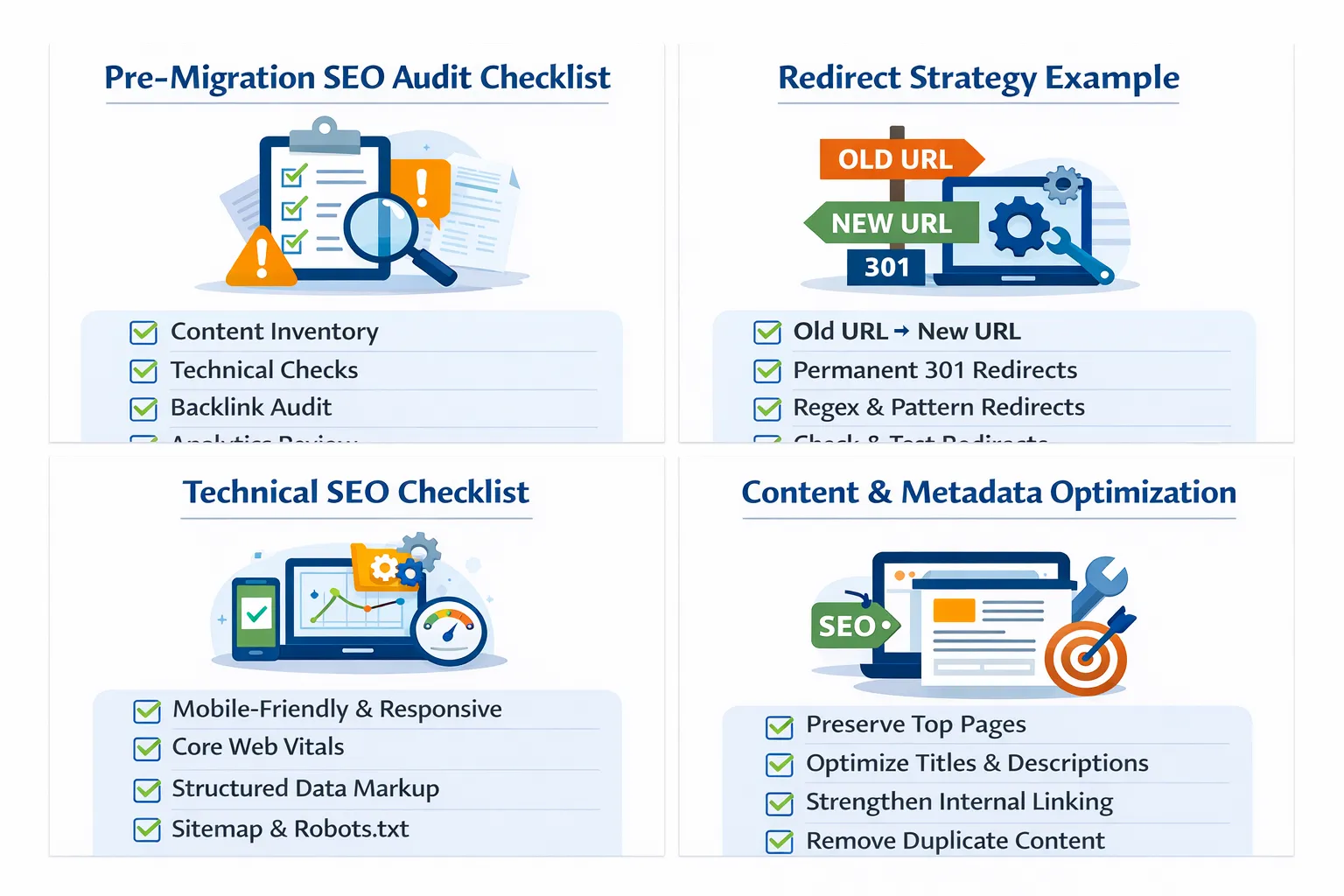
Pre-Migration SEO Preparation Checklist
Preparation is the most important phase.
A well-prepared migration rarely loses traffic.
Essential Steps
- Backup your entire website
- Export all URLs
- Analyze current rankings
- Identify top-performing pages
- Audit backlinks
- Document internal linking
This step ensures you preserve all SEO value.
You can use tools like Ahrefs or SEMrush to analyze backlinks and rankings.

What Comes Next
You now understand the foundation of preventing traffic loss.
In Part 2, you will learn:
- Step-by-step migration execution
- Redirect implementation strategy
- Technical SEO setup
This is where real execution begins.
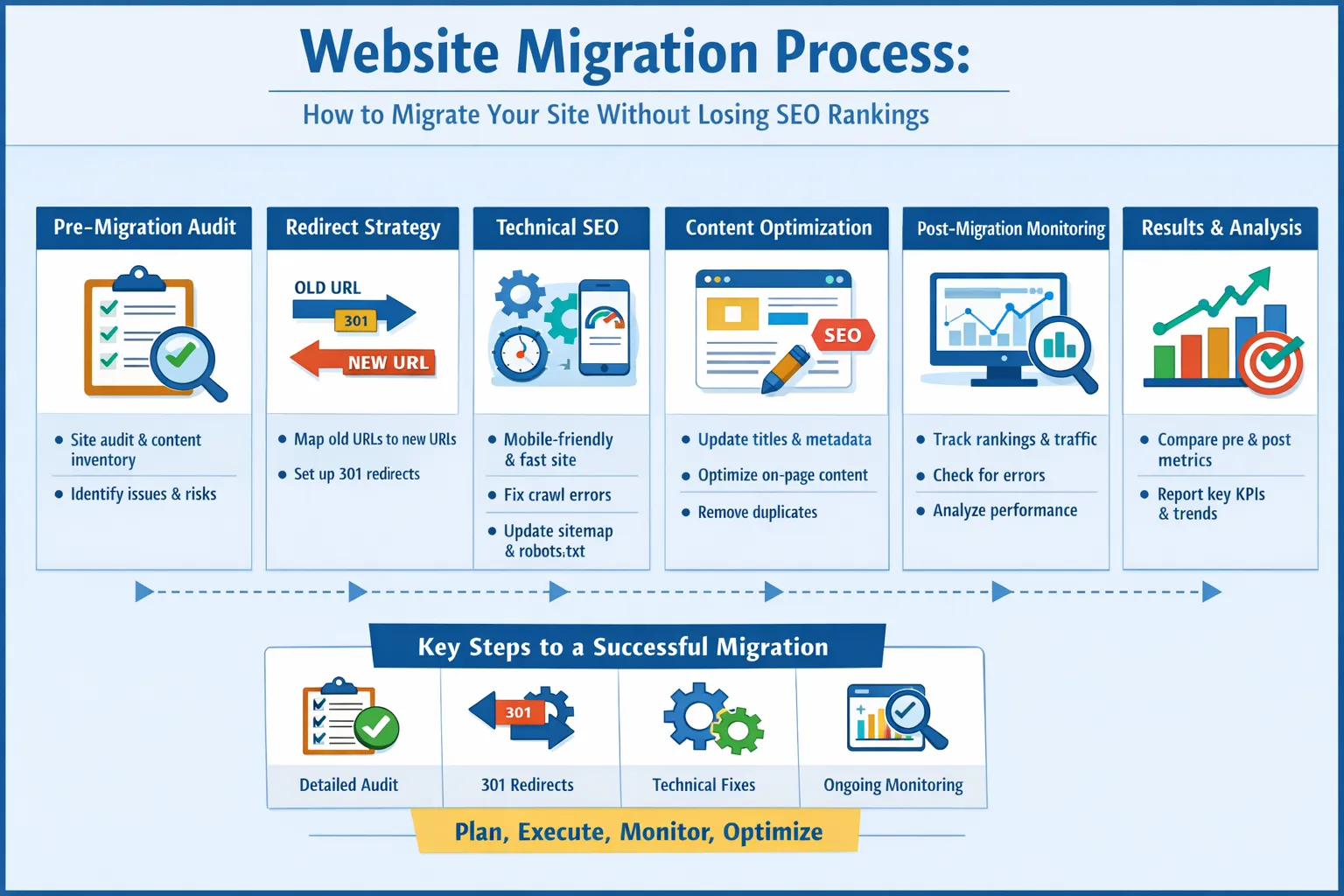
Step-by-Step Website Migration Execution Framework
Once preparation is complete, the next phase is execution.
This is where most websites lose traffic if SEO is not handled properly.
A successful migration requires preserving SEO signals while implementing structural changes.
Follow this framework to execute migration without losing rankings.

Step 1: URL Mapping (Most Critical Step)
URL mapping is the foundation of a successful migration.
It ensures that every old URL is correctly connected to a new URL.
What Is URL Mapping?
URL mapping is the process of linking old URLs to new URLs.
Example:
/old-page → /new-page
How to Create URL Mapping
- Export all current URLs
- Create a spreadsheet
- Map each old URL to a new URL
- Identify pages to merge or remove
This process prevents loss of rankings and backlinks.
Learn more in Website Redesign SEO Checklist.

Step 2: Implement 301 Redirect Strategy
For a complete redirect strategy, see our 301 Redirect SEO Guide.
Redirects are the backbone of SEO-safe migration.
They transfer ranking signals from old URLs to new ones.
Key Rule
Every old URL must redirect to the most relevant new URL.
Example
/blog/seo-guide → /blogs/seo-guide
Best Practices
- Use 301 redirects only
- Avoid redirect chains
- Avoid redirect loops
This process is explained in detail in HTTP to HTTPS Migration Guide.
You can validate redirects using HTTP Status Checker.
Step 3: Content Migration and Preservation
Content is the primary ranking factor.
Losing or modifying content incorrectly can cause traffic loss.
What to Preserve
- Top-performing pages
- Keyword-rich content
- High-ranking articles
What You Can Improve
- Content structure
- Readability
- Depth and coverage
Do not remove content blindly.

Step 4: Update Internal Linking Structure
Internal linking helps search engines understand your site structure.
During migration, internal links often break.
What to Do
- Update all internal links
- Ensure links point to new URLs
- Strengthen topic clusters
For example:
This improves SEO and crawlability.

Step 5: Preserve On-Page SEO Elements
On-page SEO elements must be maintained.
Important Elements
- Title tags
- Meta descriptions
- Headings (H1, H2)
- Keyword targeting
Losing these elements can reduce rankings.
Migration is also an opportunity to improve content.

Step 6: Technical SEO Setup
Technical SEO ensures proper indexing and crawling.
Checklist
- Update XML sitemap
- Update robots.txt
- Fix canonical tags
- Implement structured data
Submit your sitemap in Google Search Console .

Step 7: Improve Website Performance
Performance impacts both SEO and user experience.
Key Improvements
- Optimize images
- Minify CSS and JS
- Use caching
Use Google PageSpeed Insights to test performance.

Step 8: Pre-Launch Testing
Testing is critical before going live.
Test Checklist
- Check redirects
- Validate internal links
- Test all pages
- Verify SEO elements
You can use tools like Screaming Frog SEO Spider to crawl your website.

What Comes Next
You now understand how to execute migration safely.
The next step is protecting your rankings after launch.
In Part 3, you will learn:
- Critical migration mistakes
- Post-migration monitoring system
- Recovery strategies
This ensures long-term SEO stability.
Common Website Migration Mistakes (That Cause Traffic Loss)
Most traffic drops during migration are caused by avoidable mistakes.
Understanding these issues helps you prevent ranking loss.
Even a single mistake can impact your entire website.

1. No URL Mapping Strategy
Skipping URL mapping is the biggest SEO mistake during migration.
Without mapping:
- Old URLs break
- Backlinks lose value
- Rankings drop instantly
Solution
- Create a complete URL mapping sheet
- Map every old URL to a new URL
Learn the correct approach in Website Redesign SEO Checklist.

2. Missing or Incorrect Redirects
Redirects transfer SEO signals.
If they are missing:
- Google treats pages as new
- Traffic drops significantly
Common Issues
- Missing redirects
- Redirect chains
- Wrong destination URLs
Solution
- Use 301 redirects
- Test all redirects
Use tools like HTTP Status Checker to verify redirects.

3. Content Loss or Modification
Content is the main ranking factor.
Removing or changing content incorrectly can destroy rankings.
Common Problems
- Deleting high-ranking pages
- Removing keyword-rich sections
- Shortening content
Solution
- Preserve important content
- Improve instead of removing

4. Broken Internal Links
Internal links often break during migration.
This affects:
- Crawlability
- Page authority distribution
Solution
- Update all internal links
- Ensure links point to new URLs
Internal linking is critical for SEO structure.

5. Technical SEO Errors
Technical issues can severely impact SEO.
Examples
- Incorrect canonical tags
- Blocked pages in robots.txt
- Missing sitemap
Solution
- Perform full technical audit
- Fix errors before launch
Use Google Search Console to monitor issues.

Post-Migration SEO Monitoring System
After migration, monitoring is essential.
You must track performance closely to detect issues early.
1. Monitor Traffic
- Check Google Analytics
- Compare before and after data
2. Track Rankings
- Monitor keyword positions
- Identify drops quickly
3. Check Indexing
- Use Search Console
- Verify indexed pages
4. Crawl Website
- Find broken links
- Check redirects
5. Monitor Errors
- Fix 404 errors
- Resolve crawl issues
How to Recover From Traffic Loss After Migration
If your traffic already dropped, follow our post-migration monitoring guide to identify and fix issues quickly.
If traffic drops after migration, do not panic.
Most issues can be fixed.
Step 1: Identify the Problem
- Analyze traffic data
- Check rankings
- Review technical issues
Step 2: Fix Redirect Issues
- Restore missing redirects
- Fix incorrect mappings
Step 3: Restore Content
- Recover removed content
- Improve content quality
Step 4: Request Reindexing
Submit updated pages in Search Console.
Step 5: Monitor Recovery
Track progress over time.

Migration Recovery Timeline (What to Expect)
You can also validate your migration using our SEO migration testing checklist.
Understanding timelines helps set realistic expectations.
Week 1
- Google starts crawling new URLs
- Initial fluctuations occur
Week 2–4
- Rankings stabilize
- Traffic begins to recover
Month 1–3
- Full recovery expected
- SEO signals fully transferred
Proper execution minimizes fluctuations.

Advanced SEO Insights for Migration Success
Migration is not just a risk — it is also an opportunity.
1. Improve Site Structure
Better architecture improves crawlability.
2. Strengthen Internal Linking
Build strong topic clusters.
3. Optimize Technical SEO
Improve speed, mobile usability, and indexing.
4. Enhance User Experience
Better UX improves engagement.
When done correctly, migration can boost SEO performance.

What Comes Next
You now understand how to execute and protect your migration.
The final step is consolidating everything into a complete system.
In Part 4, you will get:
- Complete migration checklist
- 20+ FAQs for rich snippets
- Final SEO strategy summary
This will complete your migration SEO guide.
Complete Website Migration SEO Checklist
Use this complete checklist to ensure your website migration does not cause traffic loss.
Pre-Migration Checklist
- Backup your website
- Export all URLs
- Identify top-performing pages
- Analyze keyword rankings
- Audit backlinks
- Document internal linking structure

During Migration Checklist
- Create URL mapping sheet
- Implement 301 redirects
- Preserve high-value content
- Update internal links
- Maintain on-page SEO elements
- Fix technical issues

Post-Migration Checklist
- Update XML sitemap
- Submit sitemap to Google Search Console
- Monitor traffic and rankings
- Fix crawl errors
- Validate redirects
- Check indexing status

Following this checklist ensures a safe migration process.
Related Migration & Technical SEO Guides
This guide is part of a complete technical SEO cluster.
- HTTP to HTTPS Migration Checklist
- Website Redesign SEO Checklist
- SEO Migration Testing Checklist
- Post-Migration SEO Monitoring Guide
Together, these guides form a complete migration strategy.

Frequently Asked Questions About Site Migration SEO
1. Why did my traffic drop after website migration?
Traffic drops usually happen due to missing redirects, broken internal links, or indexing issues after migration.
2. How do I fix SEO issues after migration?
Fix redirects, restore lost content, update internal links, and submit your sitemap in Google Search Console.
3. What is the best SEO migration checklist?
The best checklist includes URL mapping, 301 redirects, content preservation, technical SEO fixes, and post-migration monitoring.
4. Can site migration cause traffic loss?
Yes, if not handled properly, migration can cause significant traffic drops.
5. How do I prevent traffic loss during migration?
Use URL mapping, 301 redirects, and preserve content.
6. What is the biggest migration mistake?
Not implementing redirects correctly.
7. How long does recovery take?
Usually 2 to 8 weeks.
8. Do I need to update backlinks?
No, redirects handle most cases.
9. What is URL mapping?
Mapping old URLs to new ones.
10. What tools help migration?
Google Search Console, Ahrefs, and Screaming Frog.
11. Should I change URLs?
Avoid unless necessary.
12. What is a 301 redirect?
A permanent redirect transferring SEO value.
13. Can I lose rankings permanently?
Only if migration is poorly executed.
14. What is crawlability?
Ability of search engines to access your site.
15. Does migration affect backlinks?
Yes, but redirects preserve value.
16. Do I need a new sitemap?
Yes, update and resubmit.
17. What is indexing?
Process of adding pages to search engines.
18. Should I monitor after migration?
Yes, monitoring is essential.
19. What is technical SEO?
Optimization of site structure and performance.
20. Can migration improve SEO?
Yes, if executed correctly.
21. What is internal linking?
Links between pages of your site.
22. Do I need testing before launch?
Yes, always test.
23. What is the safest migration strategy?
Plan, map URLs, redirect properly, and monitor.

Final Strategic Summary
Website migration is one of the most complex processes in SEO.
When done incorrectly, it can destroy traffic and rankings.
When done correctly, it can improve:
- SEO performance
- User experience
- Site structure
The key is preserving SEO signals while implementing improvements.
By following a structured checklist, avoiding common mistakes, and monitoring performance, you can migrate your website safely.
This guide provides a complete roadmap to execute migrations without losing traffic.
Combined with other technical SEO strategies, this creates a strong foundation for long-term growth.

Still worried about losing traffic after migration? Follow this SEO migration checklist step-by-step or explore our complete migration framework to ensure safe SEO growth.
This guide belongs to our structured SEO system covering keyword research, SERP analysis, technical SEO, and migration strategies.
Explore Full Framework →