
Technical SEO Fixes: Crawl, Indexing & SEO Issues
Confused about technical SEO?
If your website is not ranking, the problem is often not content — it's technical SEO.
- ✔ Understand how Google crawls and indexes your site
- ✔ Learn technical SEO step-by-step (beginner friendly)
- ✔ Avoid mistakes that stop rankings
Reviewed by SEO Expert: Hassan — Technical SEO Specialist
- Introduction to Technical SEO
- Crawlability & Site Health
- Indexing & Google Search Console
- Core Web Vitals & Speed Optimization
- Site Architecture & URL Structure
- Mobile-First SEO
- Structured Data & Schema
- HTTPS & Website Security
- Technical SEO Error Fixes
- Monitoring, Analytics & Audits
- Advanced Technical SEO Techniques
- Technical SEO FAQs
- Conclusion
Quick Technical SEO Checklist
- Ensure pages are crawlable
- Fix indexing issues in Search Console
- Improve Core Web Vitals
- Optimize internal linking
- Use proper canonical tags
Introduction to Technical SEO
Technical SEO is the foundation of a strong organic presence. While content marketing and backlinks drive traffic, technical optimization ensures search engines can crawl, index, and interpret your content effectively. Without a solid technical foundation, even high-quality content may struggle to rank.
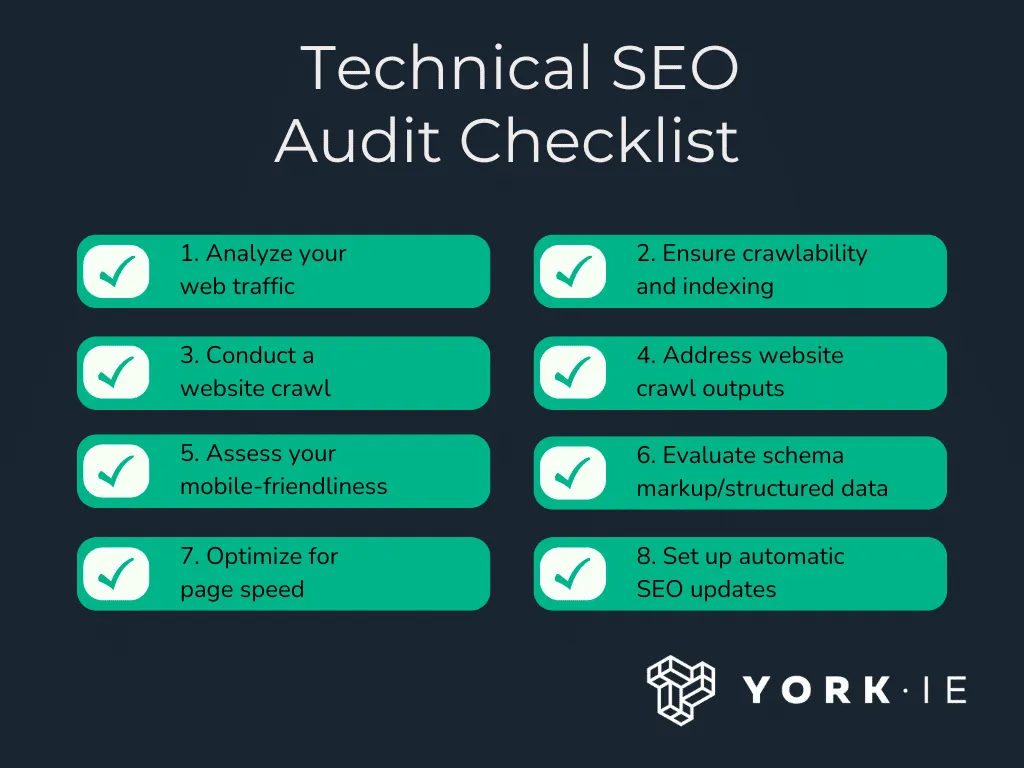
For a complete step-by-step audit process, follow our technical SEO audit checklist .
About the Author: Hassan has worked on technical SEO audits, migration recoveries, and indexing issue resolution across multiple live projects. This guide is based on real-world implementation experience, not theory.
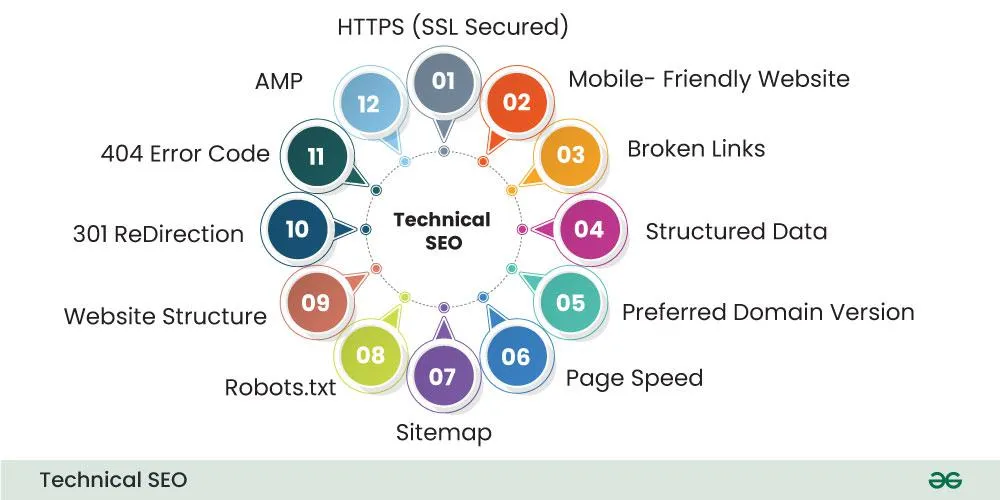
For a detailed implementation, follow our complete technical SEO audit process .
This comprehensive guide will cover:
- Ensuring site crawlability and indexation
- Optimizing site speed and Core Web Vitals
- Improving mobile experience and responsive design
- Site architecture, URL structure, and navigation
- Structured data implementation and schema for 2025 SEO
- Fixing technical errors that hurt SEO
- Monitoring and auditing performance regularly
Technical SEO issues become far more dangerous during site changes. That’s why avoiding common SEO migration mistakes is critical when moving domains, CMS platforms, or URL structures.
Crawlability & Site Health
Crawlability determines if search engines can access and index your pages. A well-crawled site ranks higher and ensures your content is discoverable.
how to fix crawl and indexing issues
Checklist for Crawlability
- Check robots.txt for accidental blockages (Google Docs)
- Verify sitemap submission in Google Search Console
- Ensure all important pages are reachable via internal links
- Remove orphan pages not linked anywhere
- Monitor crawl errors via Search Console
- Check server response codes (200, 301, 404, 500)
- Use Screaming Frog SEO Spider for crawling reports
Indexing & Google Search Console
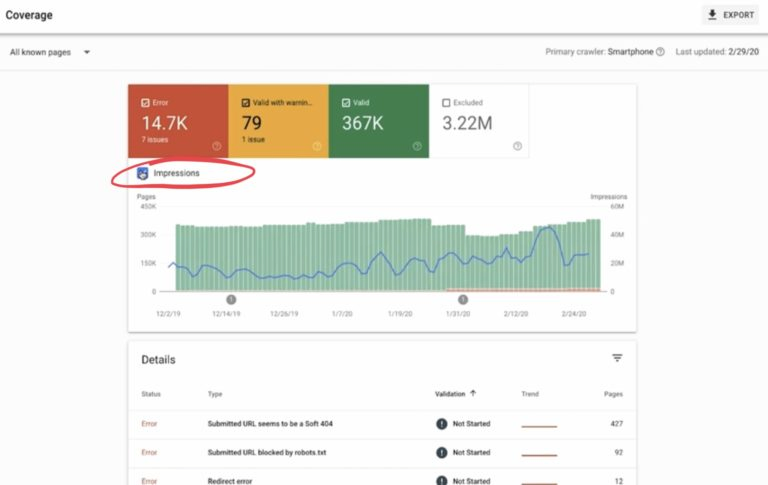
Indexing ensures pages appear in Google search results. Even if crawled, a page won’t rank if it’s not indexed properly.
Real Example: Why Technical SEO Matters
A website with great content failed to rank due to indexing issues. After fixing crawl errors and internal linking, traffic increased by 80% within 6 weeks.
If you're seeing coverage issues like "Page with Redirect" in Google Search Console, it usually indicates redirect mapping or canonical configuration problems.
Steps to Ensure Proper Indexing
- Check URL status with Search Console’s URL Inspection Tool
- Fix duplicate or thin content issues
- Correct canonical tags to avoid duplication
- Ensure noindex tags are used intentionally
- Monitor coverage reports for excluded pages
- Use structured internal linking to guide crawlers
Core Web Vitals & Speed Optimization
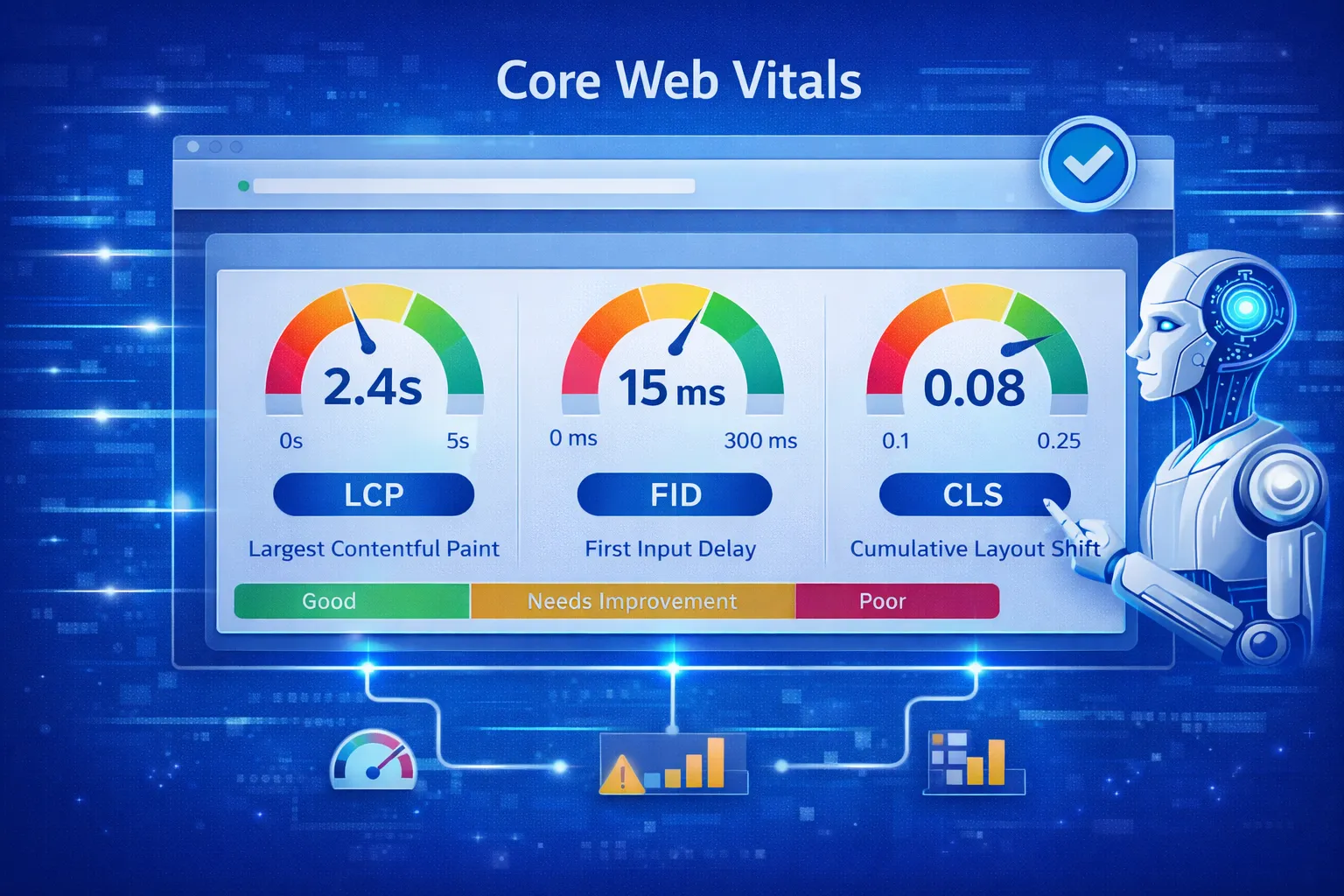
Page experience is a key ranking factor. Core Web Vitals include:
- LCP (Largest Contentful Paint): under 2.5s
- FID (First Input Delay) / INP: interactivity should feel instant
- CLS (Cumulative Layout Shift): minimal layout shifts
Speed Optimization Checklist
- Compress images using WebP format (Google WebP)
- Enable lazy loading for images & videos
- Minify HTML, CSS, JS files
- Use browser caching & CDN
- Reduce server response time
- Eliminate render-blocking resources
- Use PageSpeed Insights and Lighthouse for audits
If rankings dropped after redesign or CMS changes, review our step-by-step SEO traffic recovery after migration to diagnose performance and crawl disruption issues.
Site Architecture & URL Structure
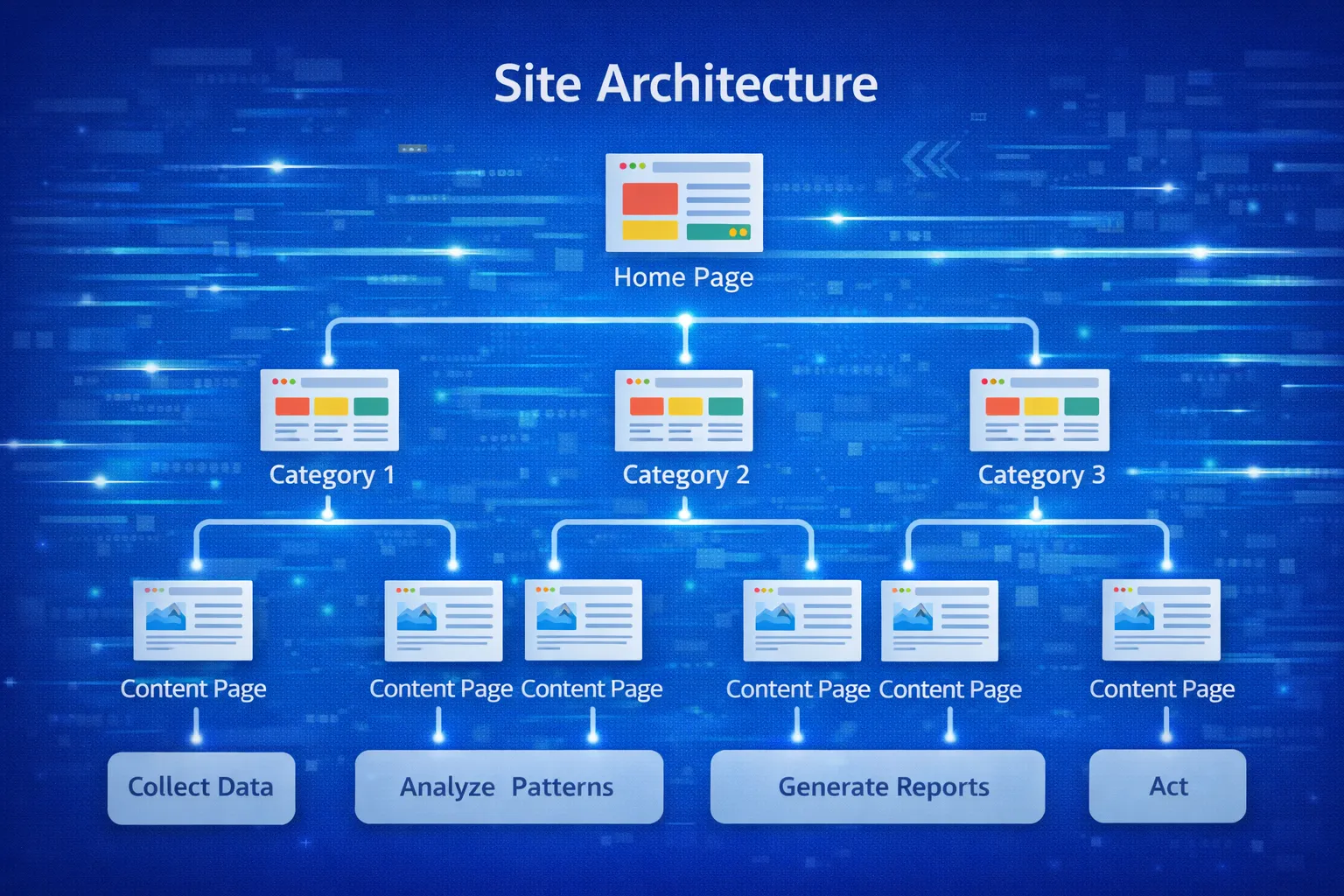
A logical site structure improves both UX and SEO. Clear navigation, short URLs, and breadcrumb trails help search engines understand your content hierarchy.
Checklist for Site Architecture
- Use short, descriptive URLs with target keywords
- Organize content into main categories and subcategories
- Implement breadcrumbs for deeper pages
- Use internal linking to related articles
- Ensure important pages are accessible within 3 clicks
- Maintain a clean and consistent navigation menu
Mobile-First SEO
Google primarily indexes the mobile version of your site. Ensure your mobile UX is flawless:
- Responsive design across devices
- Fast page loading on mobile
- Proper image sizing
- No intrusive interstitials or pop-ups
- Tap-friendly buttons & links

Structured Data & Schema
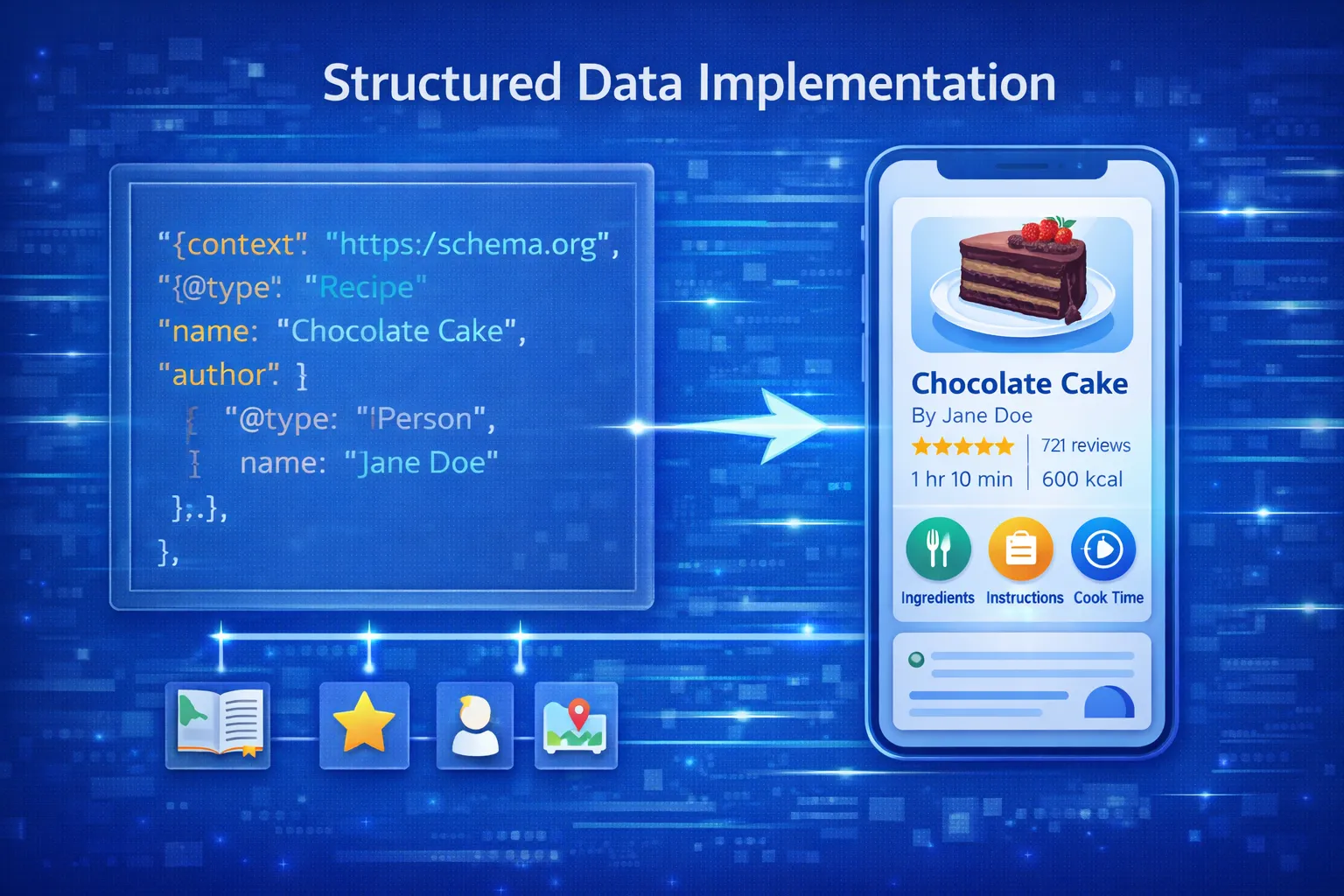
Structured data enhances SERP features and improves CTR. Common schemas:
- BlogPosting schema for articles
- FAQPage schema for frequently asked questions
- Product & Review schema for ecommerce sites
- Breadcrumb schema for navigation clarity
- Event schema for events pages
Reference: Google Structured Data
HTTPS & Website Security
- Migrate all pages to HTTPS
- Fix mixed content errors
- Use strong TLS certificates
- Redirect HTTP to HTTPS with 301
- Ensure server security & regular updates
Technical SEO Error Fixes
- Broken links & redirect loops
- Duplicate meta titles & descriptions
- 404 errors & orphan pages
- Slow server response
- Blocked resources
Use tools: Ahrefs Site Audit, Screaming Frog SEO Spider
Monitoring, Analytics & Audits
- Regular Google Search Console monitoring
- Analytics for page performance & traffic
- Site audits using Ahrefs, SEMrush, Screaming Frog
- Set up performance alerts for downtime or speed drops
- Track keyword rankings & CTR
Advanced Technical SEO Techniques
- Implement hreflang for multi-language sites
- Use canonical tags correctly to prevent duplicate content
- Optimize for Core Web Vitals programmatically
- Use log file analysis for crawler behavior insights
- Optimize structured data for rich results
- Implement lazy-loading and prefetching for large sites
- Use AMP or PWA for better mobile experience
Struggling with Technical SEO issues?
We provide full technical audits including crawl analysis, indexing diagnostics,
redirect mapping, and recovery strategies.
Need help fixing indexing issues? Get a technical SEO audit.
Technical SEO FAQs
1. What is technical SEO in simple terms?
Technical SEO is the process of optimizing your website so search engines can crawl, index, and rank it efficiently.
2. Why is technical SEO important in 2026?
Technical SEO ensures your website is fast, crawlable, mobile-friendly, and properly indexed, which directly impacts rankings, AI search visibility, and user experience.
3. What are the main components of technical SEO?
The main components include crawlability, indexing, site speed, mobile optimization, structured data, and internal linking.
4. Which tools are best for technical SEO audits?
Google Search Console, Screaming Frog, Ahrefs, SEMrush, PageSpeed Insights, and Lighthouse are the most effective tools.
5. How does crawlability affect SEO?
If search engines cannot crawl your pages, they cannot index or rank them, making crawlability essential for SEO success.
6. What is indexability in technical SEO?
Indexability determines whether a crawled page can be added to Google’s index. Pages blocked by noindex or canonical issues are excluded.
7. How do Core Web Vitals impact rankings?
Core Web Vitals measure real user experience. Poor performance can reduce rankings, engagement, and Discover visibility.
8. How can I improve Core Web Vitals?
Optimize images, reduce JavaScript, improve hosting performance, and fix layout shifts using PageSpeed Insights.
9. What is mobile-first indexing?
Google primarily uses the mobile version of your site for indexing and ranking.
10. How does site architecture affect SEO?
A clear site structure improves crawl efficiency, internal linking, and helps search engines understand content relationships.
11. What are crawl budget issues?
Crawl budget issues occur when search engines waste resources on low-value or duplicate pages instead of important content.
12. What are common technical SEO errors?
Common issues include broken links, redirect chains, duplicate content, slow pages, and incorrect canonical tags.
13. What is a canonical tag?
A canonical tag tells search engines which version of a page is the preferred one to avoid duplicate content issues.
14. How do redirects affect SEO?
Proper 301 redirects preserve SEO value, while chains and loops can harm crawl efficiency and rankings.
15. What is structured data in SEO?
Structured data helps search engines understand content and enables rich results like FAQs and featured snippets.
16. Is HTTPS required for SEO?
Yes, HTTPS is a ranking signal and improves user trust and security.
17. How does internal linking help SEO?
Internal links guide crawlers, distribute authority, and improve indexation and rankings.
18. What are soft 404 errors?
Soft 404 errors occur when a page returns a 200 status but behaves like a missing page, wasting crawl budget.
19. How often should technical SEO audits be done?
Technical SEO audits should be done quarterly, or monthly for large or ecommerce websites.
20. Can technical SEO improve rankings quickly?
Yes, fixing technical issues can improve rankings quickly, especially if crawl or indexing problems exist.
Technical SEO Cluster Resources
- Complete Technical SEO Audit Guide
- SEO Audit Checklist for New Websites
- 301 Redirect Strategy for SEO
- Website Migration SEO Checklist
- Fix Crawled – Currently Not Indexed
Need a Technical SEO Audit?
If your website has indexing issues, crawl problems, or traffic drops after migration, we provide complete technical SEO audits and recovery plans.
Request a Technical SEO Audit →Technical SEO Fixes: A Practical Troubleshooting Workflow
When a page is not being crawled, indexed, or performing as expected, start with the technical signal that can be verified rather than changing everything at once. Use this workflow to identify the issue, confirm the cause, and make the smallest useful fix.
- Check crawlability: confirm the URL returns a successful HTTP status and is not unintentionally blocked by robots.txt or other crawl controls.
- Check indexing directives: review
noindex, canonical tags, and other page-level signals that can affect index selection. - Check URL discovery: make sure important pages are included in the XML sitemap and linked from relevant crawlable pages.
- Validate redirects: confirm old URLs resolve through the intended redirect chain and do not create unnecessary hops or loops.
- Check rendering and mobile experience: verify that important content and links are available to users and search engines on mobile as well as desktop.
- Check performance: investigate Core Web Vitals and page-weight issues when slow loading or unstable layouts affect the user experience.
- Validate structured data: use the appropriate testing tools to confirm markup is valid and accurately describes the visible page.
Technical SEO Issue → How to Check → First Action
| Issue | How to check | First action |
|---|---|---|
| URL not indexed | URL Inspection and live URL test | Check crawlability, canonical, and indexing directives |
| Crawled but not indexed | Search Console indexing status | Review content quality, canonical signals, internal links, and duplication |
| Redirect problem | Test the old and destination URLs | Use one clear redirect to the final relevant URL |
| Slow page | Core Web Vitals and performance testing | Prioritize the largest blocking assets and layout shifts |
| Structured-data warning | Rich Results Test / Search Console enhancements | Correct only markup supported by the visible page |
Conclusion: Technical SEO Is the Engine Behind Every Ranking
Technical SEO is not a one-time setup or a background task — it is the infrastructure that determines whether your entire SEO strategy succeeds or fails. Content, backlinks, and keywords can only perform when search engines can crawl, index, render, and understand your website efficiently.
In 2025 and beyond, Google’s ranking systems — including AI Overviews, Discover, and entity-based search — reward websites that are fast, reliable, mobile-first, and technically clean. A slow site, broken architecture, or indexing issue can silently block growth, no matter how strong the content may be.
This guide demonstrated that modern technical SEO goes far beyond fixing errors. It is about:
- Building a logical site architecture that scales
- Ensuring efficient crawling and clean indexation
- Optimizing Core Web Vitals for real user experience
- Implementing structured data for AI and rich results
- Designing a website that works seamlessly across mobile and desktop
When technical SEO is done correctly, it creates compounding benefits: faster indexation, stronger rankings, higher Discover eligibility, better AI visibility, and improved user engagement. Most importantly, it prevents invisible issues that slowly erode performance.
The most successful websites in 2025 are not those publishing the most content — they are the ones with stable technical foundations that allow every page to perform at its highest potential.
If you treat technical SEO as an ongoing system — audited, monitored, and refined regularly — you future-proof your website against algorithm updates, AI-driven search changes, and competitive pressure.
Technical SEO is not optional. It is the engine that powers sustainable growth, long-term rankings, and search visibility well into the future.