
SEO Audit Guide: Complete Website Audit Checklist
This technical SEO audit checklist is designed for an existing website that needs a structured review of crawlability, indexing, redirects, canonicals, internal links, metadata, and other technical SEO signals.
Building a brand-new website? Use our SEO audit checklist for new websites instead.
Is your website not ranking even after publishing content?
Most websites fail because of hidden technical SEO issues like crawl errors, indexing problems, and incorrect canonical signals.
- ✔ Identify hidden technical issues killing your rankings
- ✔ Fix crawl and indexing problems step-by-step
- ✔ Recover traffic after migration or redesign
If your website already lost traffic after a redesign or migration, read our step-by-step SEO traffic recovery guide after migration .
How to Run an SEO Audit: 10-Step Workflow
Use this workflow to turn a broad website audit into a prioritized list of actions. Start with technical accessibility, then review search intent and content quality, and finish by validating the changes in Google Search Console. The goal is not to make every audit metric perfect; it is to identify issues that can prevent important pages from being crawled, indexed, understood, or chosen for relevant searches.
- Confirm crawlability: Check robots.txt, important HTTP responses, and whether critical resources can be accessed.
- Check indexability: Review noindex directives, canonical URLs, duplicate versions, and the pages Google has actually indexed.
- Review sitemap discovery: Make sure important canonical URLs are represented in the XML sitemap and that outdated URLs are not unnecessarily included.
- Audit redirects and migrations: Test old-to-new URL mappings, redirect chains, internal links, and canonical destinations after redesigns or migrations.
- Audit on-page relevance: Compare titles, headings, content, and page intent with the searches the page is already receiving in Search Console.
- Review internal linking: Make sure important pages are linked from relevant content and that links use descriptive, useful anchor text.
- Check performance and mobile UX: Review Core Web Vitals and major usability problems, especially on important landing pages.
- Validate structured data: Check that markup accurately describes visible page content and fix critical errors rather than adding schema simply for its own sake.
- Prioritize findings: Separate blockers from improvements. Fix indexability, crawl, redirect, and canonical problems before spending time on lower-impact refinements.
- Measure after changes: Use Search Console to compare impressions, clicks, CTR, queries, and indexed URLs after Google has had time to recrawl the updated pages.
SEO Audit Finding → Impact → First Action
| Finding | Potential impact | First action |
|---|---|---|
| Important page blocked or noindexed | Page may not be eligible for indexing | Inspect the URL and review robots/noindex directives |
| Incorrect canonical | Signals may consolidate to the wrong URL | Compare canonical, redirects, sitemap, and internal links |
| Traffic loss after redesign | Old rankings or URL signals may not transfer correctly | Compare old/new URLs and test redirect coverage |
| High impressions, low clicks | Search visibility is not translating into visits | Review query intent, title, snippet, and ranking position in GSC |
| Content ranks for the wrong intent | Relevance can limit ranking growth | Map the page to the dominant SERP intent before rewriting |
Important: Google recommends using Search Console to monitor crawling, indexing, search performance, and structured-data changes. After significant updates, allow time for recrawling and reindexing before judging the result. citeturn0search1turn0search4
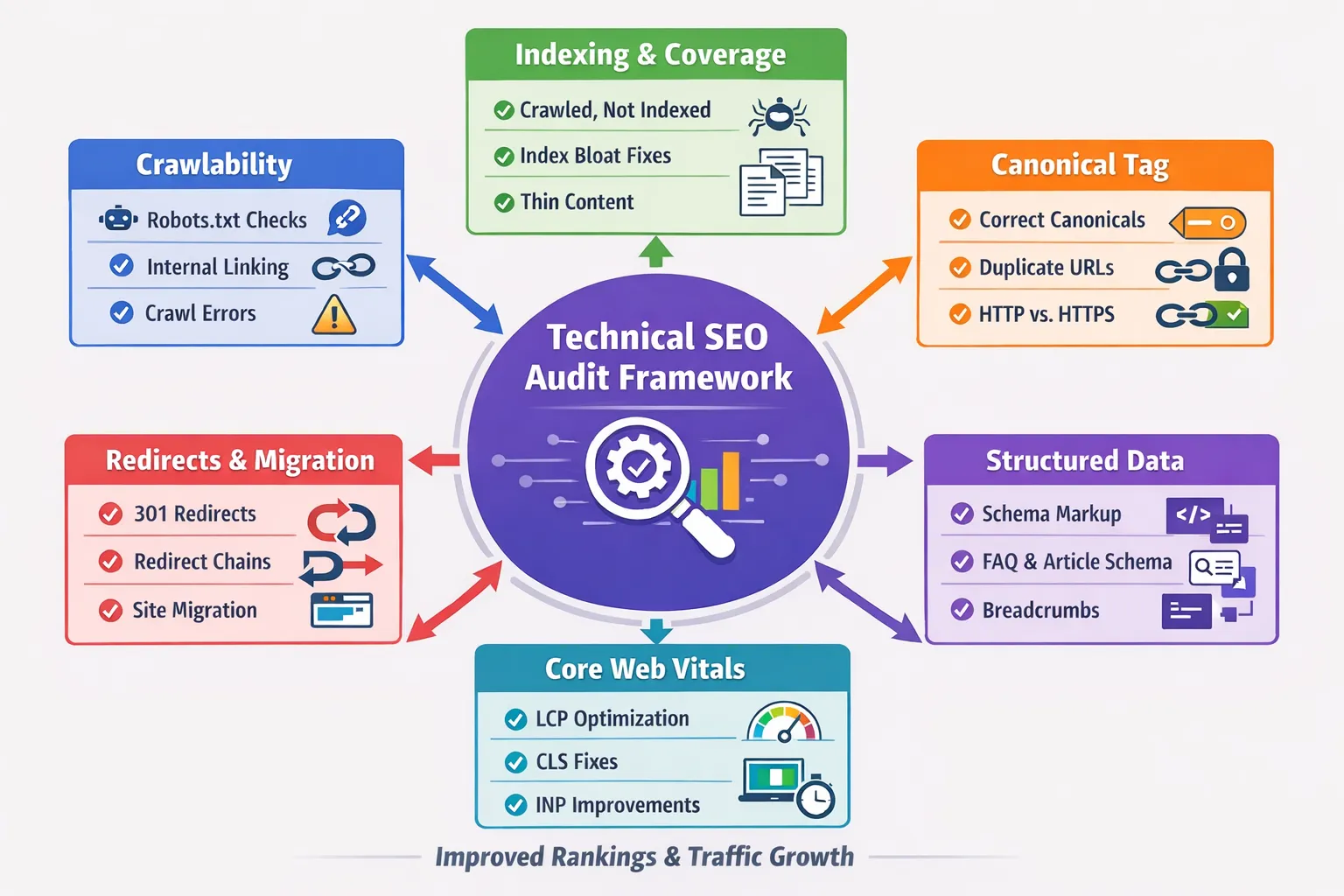
A technical SEO audit is the foundation of sustainable search growth. Without a proper audit, even the best content strategy will fail because search engines cannot crawl, index, or interpret your website correctly.
If you are launching a brand-new domain, start with our SEO Audit Checklist for New Websites to build a strong SEO foundation before moving into advanced technical audits.
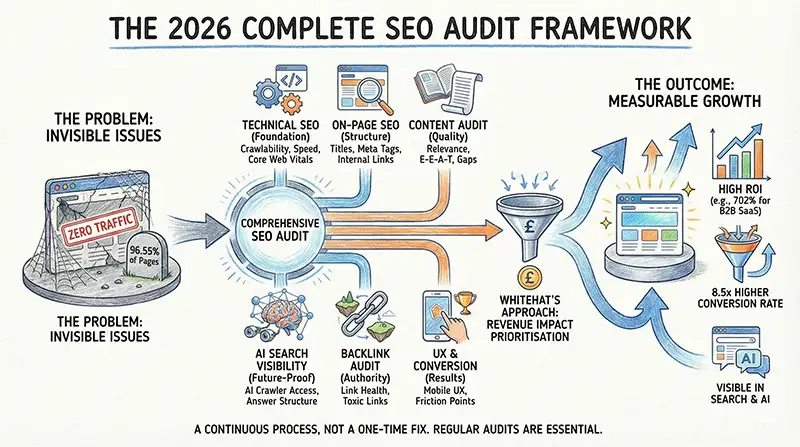
In 2026, search engines prioritize:
- Clean crawl architecture
- Proper canonical structure
- Core Web Vitals performance
- Internal linking hierarchy
- Structured data clarity
If your site has migration errors, crawl waste, duplicate content, or index bloat — rankings will stagnate no matter how many articles you publish.
If you're planning a redesign or platform change, you must combine this audit with a structured complete website migration SEO checklist for traffic recovery to prevent traffic drops.
What Is a Technical SEO Audit?
A technical SEO audit is a systematic review of your website’s infrastructure to ensure search engines can:
- Crawl your pages efficiently
- Index the correct URLs
- Understand page hierarchy
- Process canonical signals correctly
- Render content without issues
It focuses on the technical foundation, not content writing.
Think of it like building a house:
- Content = Furniture
- Backlinks = Popularity
- Technical SEO = Foundation
Why Technical SEO Audits Matter in 2026
Google’s algorithms now rely heavily on:
- Entity understanding
- Topical authority signals
- Crawl budget optimization
- User experience metrics
If your website has:
- Duplicate URLs
- Incorrect canonical tags
- Thin indexed pages
- Soft 404 errors
- Broken internal links
Google may:
- Ignore your pages
- Choose wrong canonical versions
- Reduce crawl frequency
- Lower trust signals
You can see examples of canonical conflicts inside URL Unknown to Google – Explained.
Without a technical audit, you are guessing. With an audit, you diagnose before fixing.
When You Need a Technical SEO Audit
You should run a full technical audit if:- Your impressions increase but clicks remain low
- Your rankings fluctuate suddenly
- You migrated domains or CMS
- Traffic dropped after redesign
- Google Search Console shows indexing errors
- You see "Crawled – currently not indexed" issues
Migration-related drops are covered in: SEO Traffic Dropped After Migration
Step 1: Crawlability Audit
Before Google ranks you, it must crawl you.
Crawlability determines whether search engine bots can access and discover your pages.
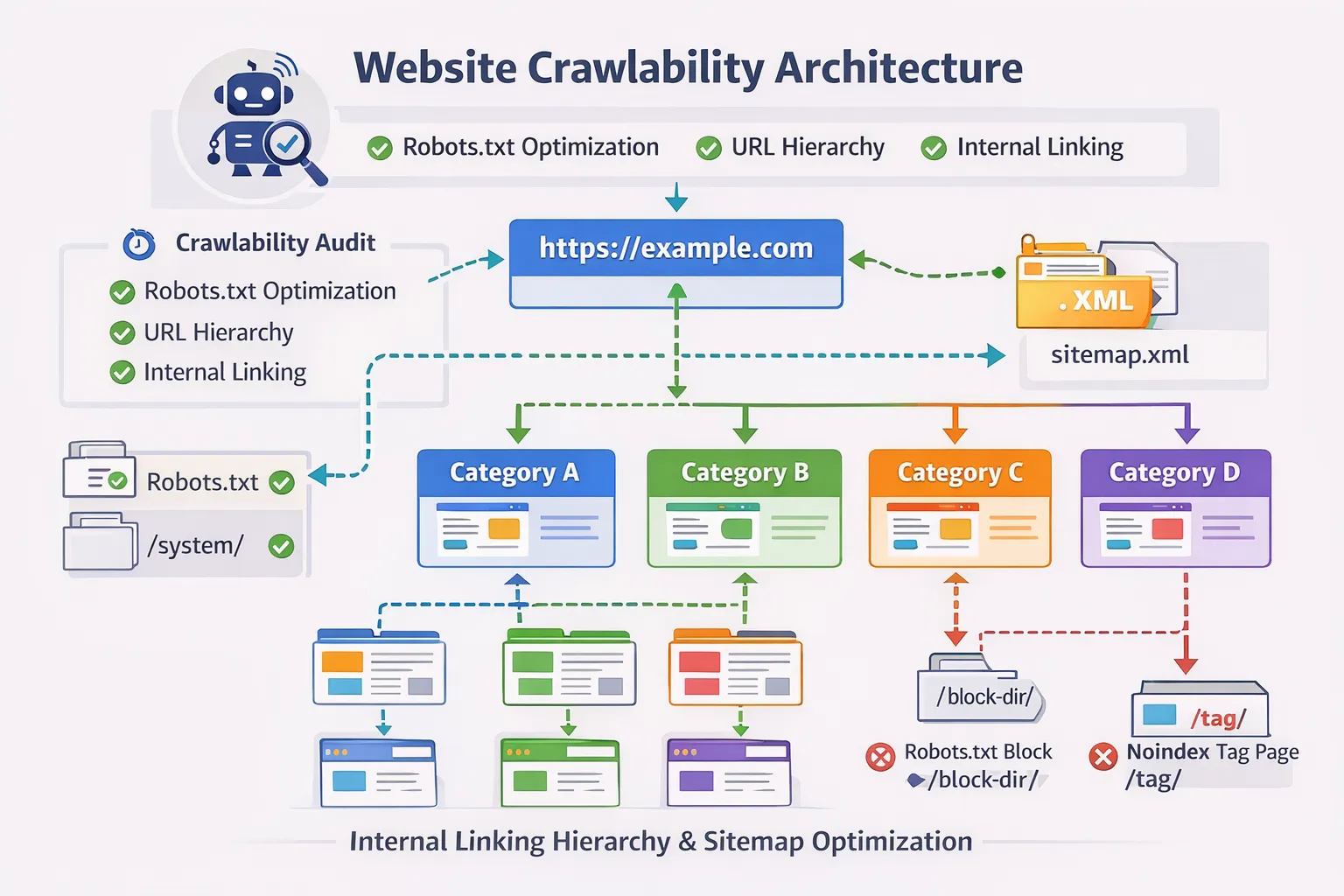
1. Check robots.txt
Your robots.txt file must:
- Not block important directories
- Allow crawling of CSS & JS
- Reference your sitemap correctly
User-agent: *
Allow: /
Sitemap: https://digitalskillearnhub.com/sitemap.xml
2. Identify Crawl Errors
Use:- Google Search Console → Pages
- URL Inspection tool
- Blocked by robots.txt
- Server errors (5xx)
- Soft 404
- Redirect chains
3. Remove Crawl Waste
Crawl waste happens when Google crawls pages that shouldn't be indexed:- Tag pages
- Thin archives
- Duplicate parameter URLs
- Test pages
- Use canonical tags properly
- Apply noindex where necessary
- Fix internal linking pointing to useless pages
4. Audit Internal Linking Structure
Search engines discover new pages via internal links. Check:- Orphan pages (no internal links)
- Broken links
- Over-optimized anchor text
- Weak topical clusters
In Part 2, we will cover:
- Indexing & Canonical Audit
- Redirect & Migration Audit
- Core Web Vitals & Page Speed
- Schema & Structured Data Validation
Step 2: Indexing & Coverage Audit
Crawling does not guarantee indexing.
Google may crawl a page and still choose not to index it. This is one of the most misunderstood areas of SEO.
Inside Google Search Console → Pages report, you will see statuses such as:
- Crawled – currently not indexed
- Discovered – currently not indexed
- Duplicate without user-selected canonical
- Alternate page with proper canonical
Each of these means something different.
1. Crawled – Currently Not Indexed
This means:
- Google crawled the page
- Google rendered it
- Google decided not to index it
Common causes:
- Thin content
- Weak internal linking
- Duplicate search intent
- Low authority signals
Detailed fix guide: How to Fix Crawled – Currently Not Indexed
2. Discovered – Currently Not Indexed
This means Google knows the URL exists but hasn’t crawled it yet.
Usually caused by:
- Low internal linking
- Deep URL structure
- Crawl prioritization issues
Solution:
- Link from high-authority pages
- Add to sitemap
- Improve topical cluster strength
3. Index Bloat Detection
Index bloat happens when low-quality or unnecessary pages are indexed.
Check:
site:digitalskillearnhub.comLook for:
- Thin pages
- Old test URLs
- Parameter duplicates
- Unnecessary archive pages
If found:
- Apply noindex where appropriate
- Consolidate duplicate content
- Strengthen canonical signals
Step 3: Canonical Tag Audit
Canonical tags tell Google which URL version should rank.
Improper canonical configuration can silently destroy rankings.
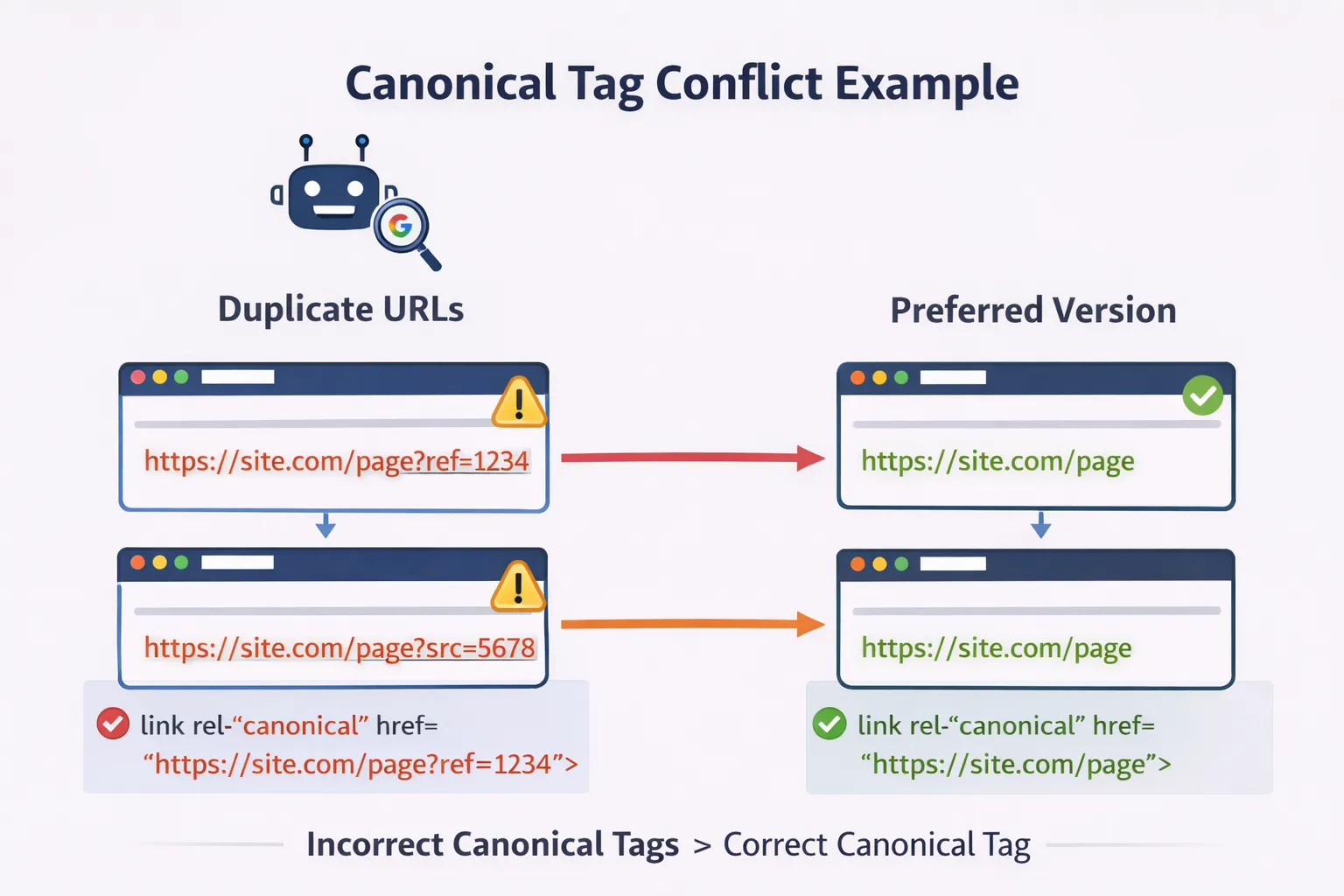
Common Canonical Problems
- Self-referencing canonical missing
- Canonical pointing to redirected URL
- Canonical mismatch between HTTP and HTTPS
- Multiple URLs competing for same keyword
Every indexable page should include:
<link rel="canonical" href="https://digitalskillearnhub.com/blogs/seo-audit" />
Check for Canonical Conflicts
Use:- URL Inspection → View crawled page
- View source code
If Google-selected canonical differs from user-declared canonical, you likely have duplicate intent or stronger competing URL.
Related reading: Google Search Console Errors Explained
Step 4: Redirect & Migration Audit
Real Example: Traffic Drop After Migration
A website lost 60% traffic after migration due to:
- Missing 301 redirects
- Broken internal links
- Canonical conflicts
After fixing these issues, traffic recovered within 6 weeks.
Redirect errors are the most common cause of traffic drops after redesign.
When URLs change without proper 301 mapping:
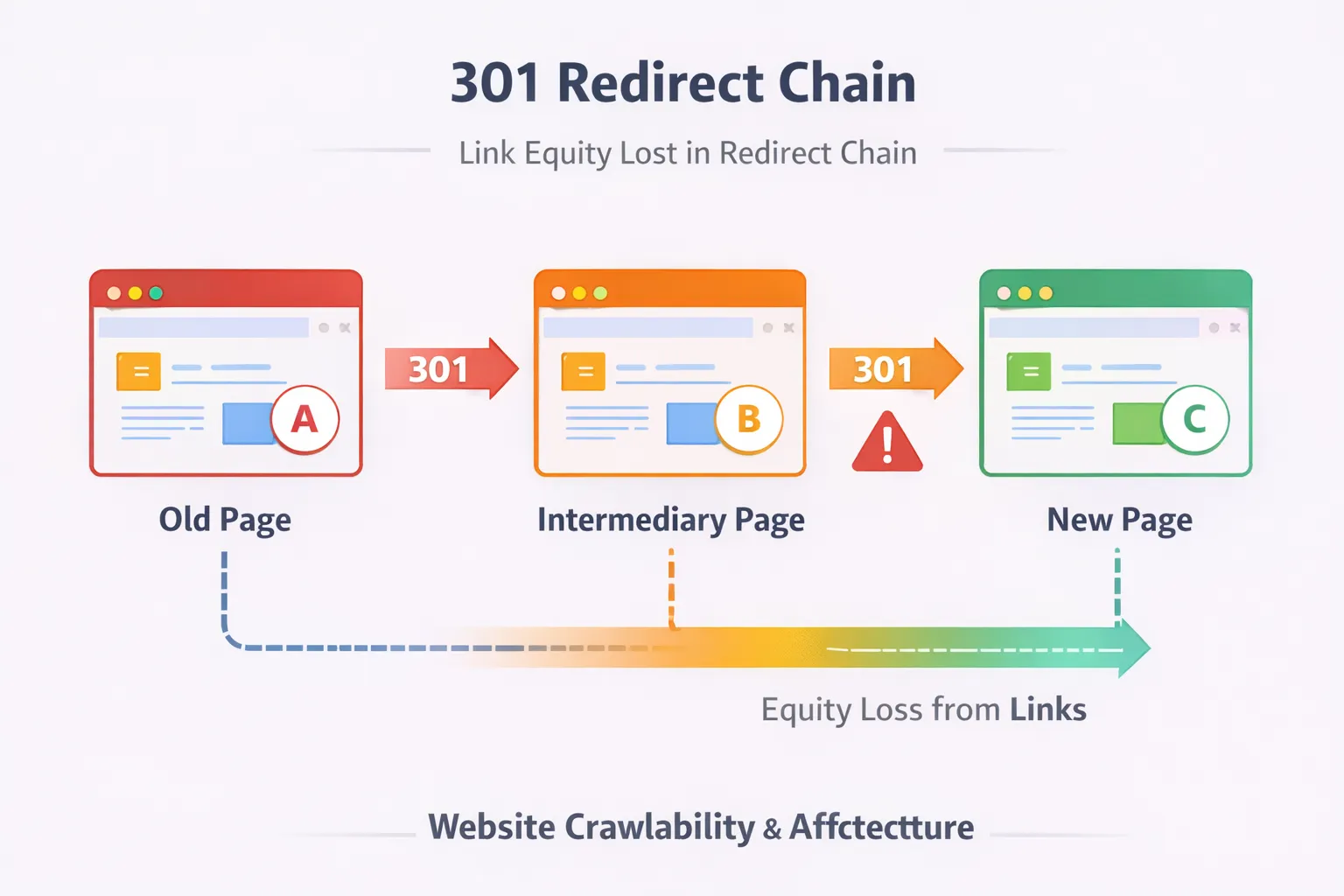
- Link equity is lost
- Google re-evaluates content from scratch
- Rankings drop dramatically
Audit Checklist
- No redirect chains (A → B → C)
- No 302 redirects for permanent changes
- No internal links pointing to redirected URLs
- All old URLs mapped to most relevant new version
Migration failure recovery guide: SEO Traffic Dropped After Migration
Complete planning checklist: complete website migration SEO checklist for traffic recovery
Redirect Mapping Strategy
Before migration:- Export all URLs
- Map old → new versions in spreadsheet
- Test using HTTP status checker
- Re-crawl entire site
- Fix broken internal links
- Resubmit sitemap
Step 5: Core Web Vitals & Performance Audit
Performance now directly influences:
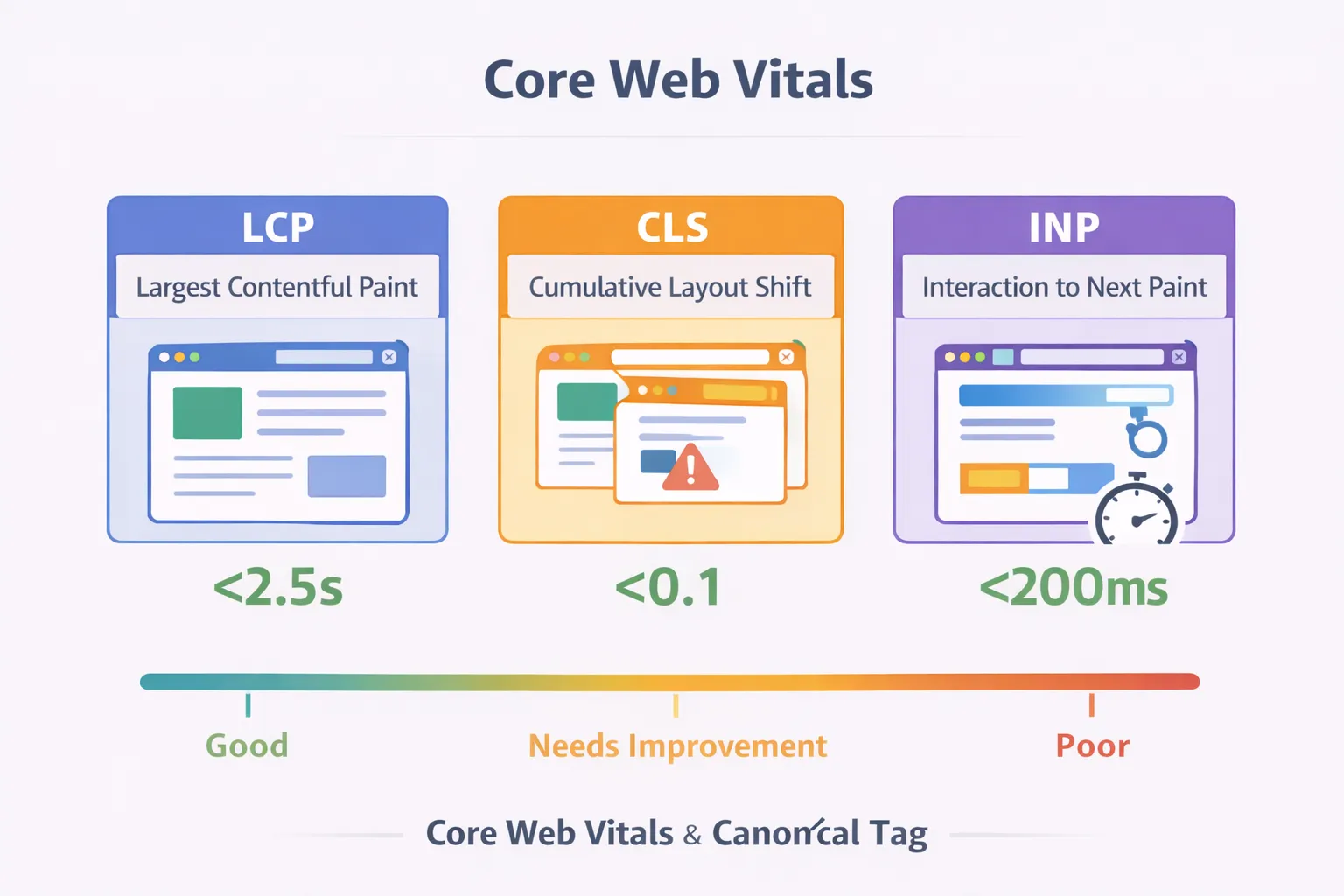
- Crawl efficiency
- User experience
- Conversion rate
- Trust signals
Key Metrics
- LCP (Largest Contentful Paint) – Should be under 2.5s
- CLS (Cumulative Layout Shift) – Should be under 0.1
- INP (Interaction to Next Paint) – Under 200ms
- PageSpeed Insights
- Chrome Lighthouse
- Search Console → Core Web Vitals
Common Speed Issues
- Large images
- Unminified JavaScript
- Unused CSS
- Slow hosting
Quick Fixes
- Compress images
- Use modern formats (WebP)
- Enable caching
- Reduce third-party scripts
Performance improvements often increase impressions before clicks improve.
Step 6: Structured Data & Schema Audit
Schema helps Google understand content type and context.
For SEO audit articles, you should include:
- Article schema
- FAQ schema
- Breadcrumb schema
Validate Schema
Use:- Google Rich Results Test
- Schema Markup Validator
Common Schema Mistakes
- Invalid JSON format
- FAQ not matching visible content
- Wrong canonical in structured data
{
  "@context": "https://schema.org",
  "@type": "Article",
  "headline": "SEO Audit Guide (2026)"
}
Proper schema increases:
- Rich results
- CTR
- Authority perception
End of Part 2
So far we covered:
- Crawlability
- Indexing diagnostics
- Canonical conflicts
- Redirect mapping
- Core Web Vitals
- Schema validation
In Part 3, we will cover:
- Internal linking architecture for authority
- Topical clustering framework
- Log file analysis basics
- Advanced crawl budget optimization
- SEO audit reporting template
Step 7: Internal Linking Architecture for Authority
Internal linking is one of the most powerful — and most underused — ranking levers.
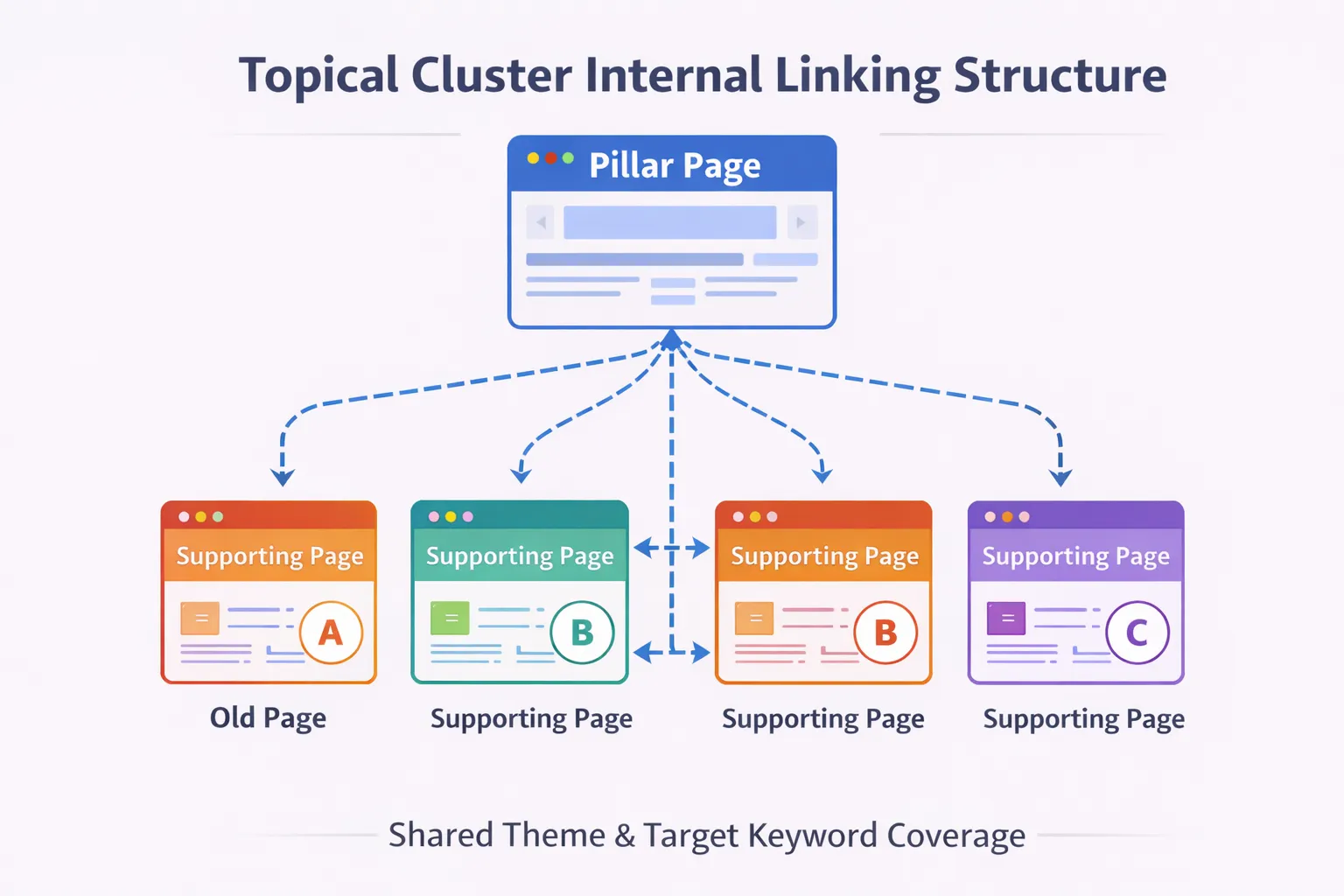
Google uses internal links to:
- Discover pages
- Understand topical relationships
- Distribute link equity
- Determine importance hierarchy
If your internal linking is weak, even great content struggles to rank.
Audit Checklist
- Are pillar pages receiving the most internal links?
- Are important pages linked from navigation?
- Are anchor texts descriptive (not generic “click here”)?
- Are any links pointing to redirected URLs?
For example, your migration cluster should interlink like this:
- Website Migration SEO Hub (pillar)
- complete website migration SEO checklist for traffic recovery
- SEO Traffic Dropped After Migration
- SEO Migration Mistakes
- 301 Redirect Strategy
Each supporting article should link back to the pillar.
Authority Flow Principle
High-authority pages should link to:
- New content
- Struggling pages
- Commercial pages
This redistributes ranking strength across your site.
Step 8: Topical Clustering Framework
Modern SEO rewards topic depth, not isolated articles.
Instead of writing random blog posts, build structured clusters:
- Pillar Page → broad topic
- Cluster Pages → subtopics
- Interlinked internally
Example Cluster: Technical SEO
- Pillar: Technical SEO Audit Guide (this page)
- Cluster: Crawled – Not Indexed Fix
- Cluster: Page with Redirect Issue
- Cluster: Canonical Problems
- Cluster: Website Migration Checklist
When Google sees:
- Consistent internal links
- Shared keyword themes
- Semantic depth
It increases topical authority.
That leads to:
- Higher impressions
- Faster indexing
- Better long-tail coverage
Step 9: Crawl Budget Optimization
Crawl budget matters when:
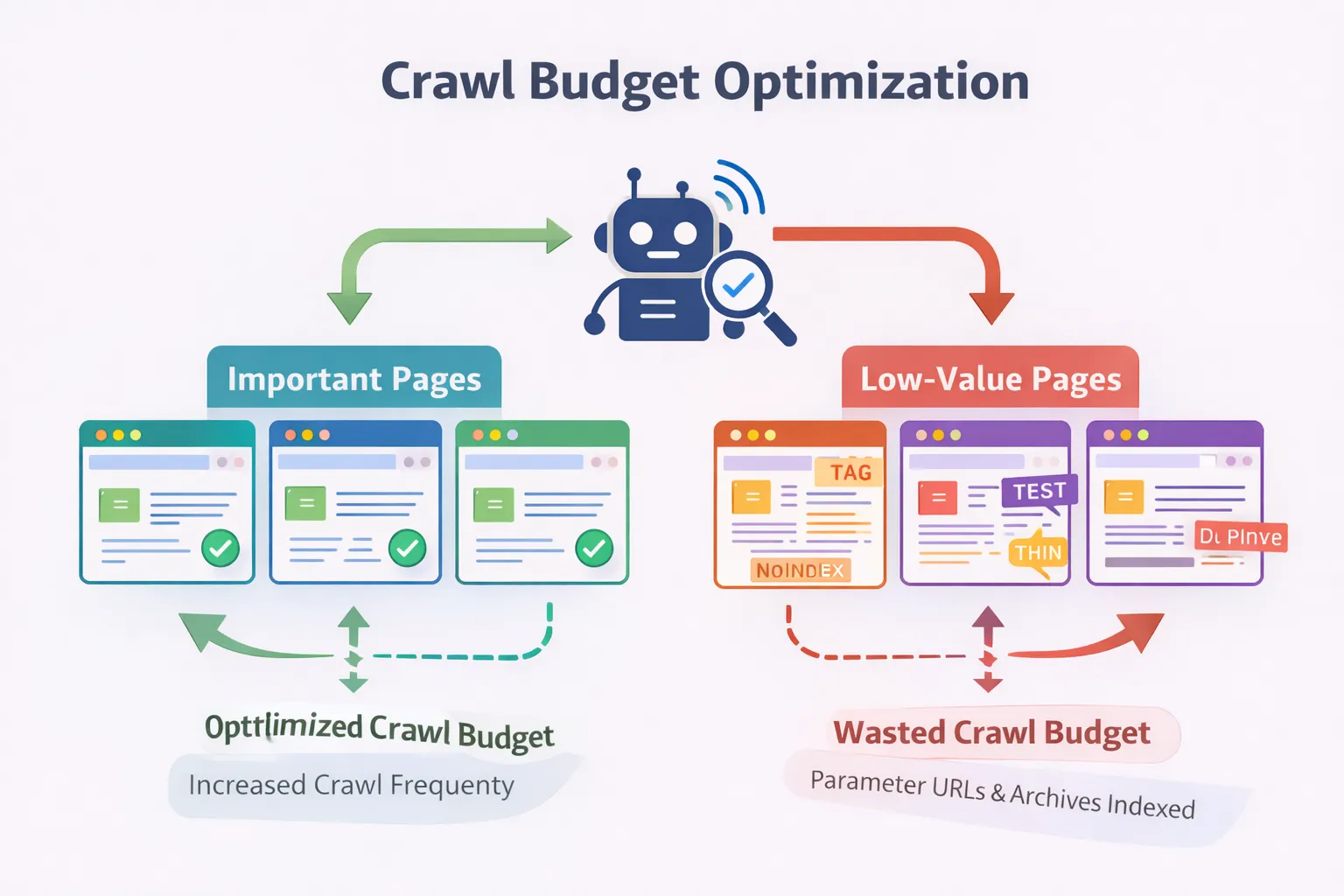
- You have many pages
- You generate parameter URLs
- You recently migrated
Symptoms of Crawl Waste
- Many parameter URLs crawled
- Low-value pages frequently crawled
- Important pages rarely crawled
Check in: Search Console → Settings → Crawl stats
Optimization Techniques
- Remove junk URLs from sitemap
- Block unnecessary parameters in robots.txt
- Use canonical correctly
- Strengthen internal linking to important pages
Remember: Crawl efficiency improves indexing speed.
Step 10: Log File Analysis Basics
Log files show how Googlebot actually behaves.
Unlike Search Console, log files reveal:
- Exact crawl frequency
- Status codes returned
- Bot behavior patterns
What to Look For
- Important pages rarely crawled
- 404 URLs repeatedly crawled
- Redirect chains hit frequently
Even basic log analysis can uncover hidden technical problems.
For large sites, this step is critical after migration.
Step 11: Content Quality & Intent Alignment
Technical SEO fixes technical problems. But rankings depend heavily on content quality.
Content Audit Questions
- Does the page fully answer the query?
- Does it match search intent?
- Does it outperform current top results?
- Is it internally linked properly?
Fix your SEO issues step-by-step using this checklist. Get SEO Audit Help →
If a page shows:
- Crawled – not indexed
- Low impressions
- High bounce rate
The problem is often content depth.
Solution:
- Expand sections
- Add examples
- Add diagrams or data
- Improve structure
Step 12: SEO Audit Reporting Framework
An audit without action is useless.
Your report should include:
1. Executive Summary
- Major issues found
- Estimated impact
- Priority order
2. Technical Issues
- Crawl errors
- Indexing issues
- Redirect problems
- Canonical conflicts
3. Performance Issues
- Core Web Vitals
- Server response times
- JavaScript blocking
4. Content & Authority Issues
- Thin content
- Keyword cannibalization
- Internal link weaknesses
5. Action Plan
- Immediate fixes (Week 1–2)
- Medium-term improvements (Month 1)
- Authority building (Month 2–3)
Prioritization matters more than volume of recommendations.
Ranking Recovery Timeline
Week 1–2
- Fix technical errors
- Update sitemap
- Resubmit critical URLs
Week 3–4
- Impressions begin increasing
- Indexing stabilizes
- Core issues disappear from GSC
Month 2–3
- Keyword rankings improve
- Clicks increase
- New pages index faster
Large migrations may take 3–6 months.
Final Strategy: Turning Technical SEO Into Revenue
Technical SEO alone does not make money.
It creates the foundation for:
- Content marketing
- Lead generation
- Service conversions
- Affiliate revenue
Once your site is technically clean:
- Target high-intent keywords
- Build backlinks to pillar pages
- Strengthen topical clusters
- Improve CTR using GSC data
Technical stability + topical authority = sustainable rankings.
End of Part 3
You now have a complete technical SEO audit framework covering:
- Crawling
- Indexing
- Canonical management
- Redirect strategy
- Performance optimization
- Structured data
- Internal linking
- Cluster building
- Crawl budget control
- Audit reporting
In Part 4, we will add:
- 40+ high-searchable FAQs
- Advanced troubleshooting scenarios
- Post-migration disaster recovery plan
- Conversion-optimized CTA structure
To strengthen your SEO strategy further, follow our complete keyword research strategy for SEO .
Advanced Technical SEO Troubleshooting Scenarios
Even after a full audit, some SEO issues persist. Below are advanced scenarios commonly seen in 2026.
1. Pages Indexed But Not Ranking
- Search intent mismatch
- Weak internal linking
- Low authority compared to competitors
- Thin or generic content
Fix: Improve topical depth, strengthen cluster linking, build backlinks.
2. Impressions Growing But Clicks Not Increasing
- Poor title tag optimization
- Low CTR from weak meta descriptions
- Featured snippet competition
Fix: Rewrite titles using power words, numbers, and clarity.
3. Migration Caused 30–70% Traffic Drop
- Missing 301 redirects
- Canonical conflicts
- Internal links pointing to old URLs
- Lost backlinks
Fix: Compare old vs new URL map and audit redirect chains.
4. Google De-Indexes Pages Randomly
- Low quality signals
- Duplicate content clusters
- Thin tag/category pages
Fix: Consolidate weak pages into stronger pillar assets.
Post-Migration Disaster Recovery Plan
Step 1: Crawl the Entire Site
Use Screaming Frog or similar tool to identify:
- 404 pages
- Redirect chains
- Canonical inconsistencies
Step 2: Compare Pre & Post Migration URLs
Ensure every old URL maps to a relevant new URL.
Step 3: Check Search Console Coverage
- Crawled – not indexed
- Duplicate without canonical
- Page with redirect
Step 4: Strengthen Internal Links
Link important pages from homepage and top cluster pages.
Step 5: Monitor Weekly
Recovery can take 4–12 weeks depending on site size.
Technical SEO Audit FAQs (Complete Guide)
1. What is a technical SEO audit?
A technical SEO audit evaluates crawlability, indexability, performance, and structural integrity of a website.
2. How often should I perform an SEO audit?
At least once per quarter. After migrations, audits should be immediate.
3. Do technical issues always hurt rankings?
No. Only issues affecting important URLs impact rankings significantly.
4. What is the difference between crawling and indexing?
Crawling is discovery. Indexing is inclusion in search results.
5. What causes “Crawled – currently not indexed”?
Low quality signals, duplication, or weak internal linking.
6. Is crawl budget important for small websites?
Rarely. It matters more for large or complex sites.
7. Should I fix all 404 errors?
No. Only fix 404s that affect valuable pages or backlinks.
8. What is a soft 404?
A page returning 200 status but containing no meaningful content.
9. Are 301 redirects permanent?
Yes. They transfer most link equity and should remain active long-term.
10. Can wrong canonical tags hurt rankings?
Yes. They can remove pages from index or misattribute signals.
11. Do Core Web Vitals affect rankings?
Yes, but mildly. They impact UX more than rankings.
12. What tools are best for technical audits?
Google Search Console, Screaming Frog, Ahrefs, and server logs.
13. Can JavaScript block indexing?
Heavy JS can delay rendering and cause indexing issues.
14. What is index bloat?
Too many low-value pages indexed, diluting site authority.
15. How do I reduce duplicate content?
Use canonical tags, consolidate similar pages, and improve structure.
Conversion Optimization Layer
Technical SEO brings traffic. Conversion strategy turns traffic into revenue.
Add Clear CTA Blocks
- “Need a Technical SEO Audit?”
- “Recover Traffic After Migration”
- “Request a Site Audit Consultation”
Place CTA blocks:
- Mid-content
- After FAQs
- Before conclusion
Example CTA Section
Need Help Fixing Technical SEO Issues?
If your site lost traffic, shows indexing errors, or suffered after migration, we provide detailed technical SEO audits and recovery plans.
Who Should Use This Technical SEO Audit Guide?
- Website owners struggling with rankings
- SEO professionals managing migrations
- Bloggers facing indexing issues
- Agencies handling client audits
Final Thoughts
A technical SEO audit is not just a checklist — it is a structural blueprint for sustainable rankings.
When you combine:
- Clean crawl architecture
- Strong internal linking
- Migration discipline
- Content quality alignment
- Authority building
You create long-term search visibility.
SEO in 2026 rewards depth, structure, and expertise. Technical precision is your foundation.
Hassan is a Technical SEO consultant specializing in website migrations, indexing recovery, and authority-driven internal architecture.