
Why Your Clicks Dropped Even Though Impressions Are Up (Google AI Overviews, 2026)
Why are my clicks falling while impressions keep growing? The most common cause in 2026 is Google AI Overviews. Your page is still being shown to Google's systems and counted as an impression, but the AI-generated answer box above the results is answering the query directly — so a growing share of users never scroll down to click your link at all.
If you're also seeing pages with impressions but a flat CTR, read our companion guide on why websites get impressions but no clicks for the ranking and title side of this problem.
This isn't a bug or a temporary glitch. It's a structural shift in how Google Search works, and it's measurable. In this guide, we'll walk through the actual 2026 data on AI Overviews, why it hits impressions and clicks differently, and six fixes that help you recover traffic instead of just watching the graph decline.
What Are Google AI Overviews?
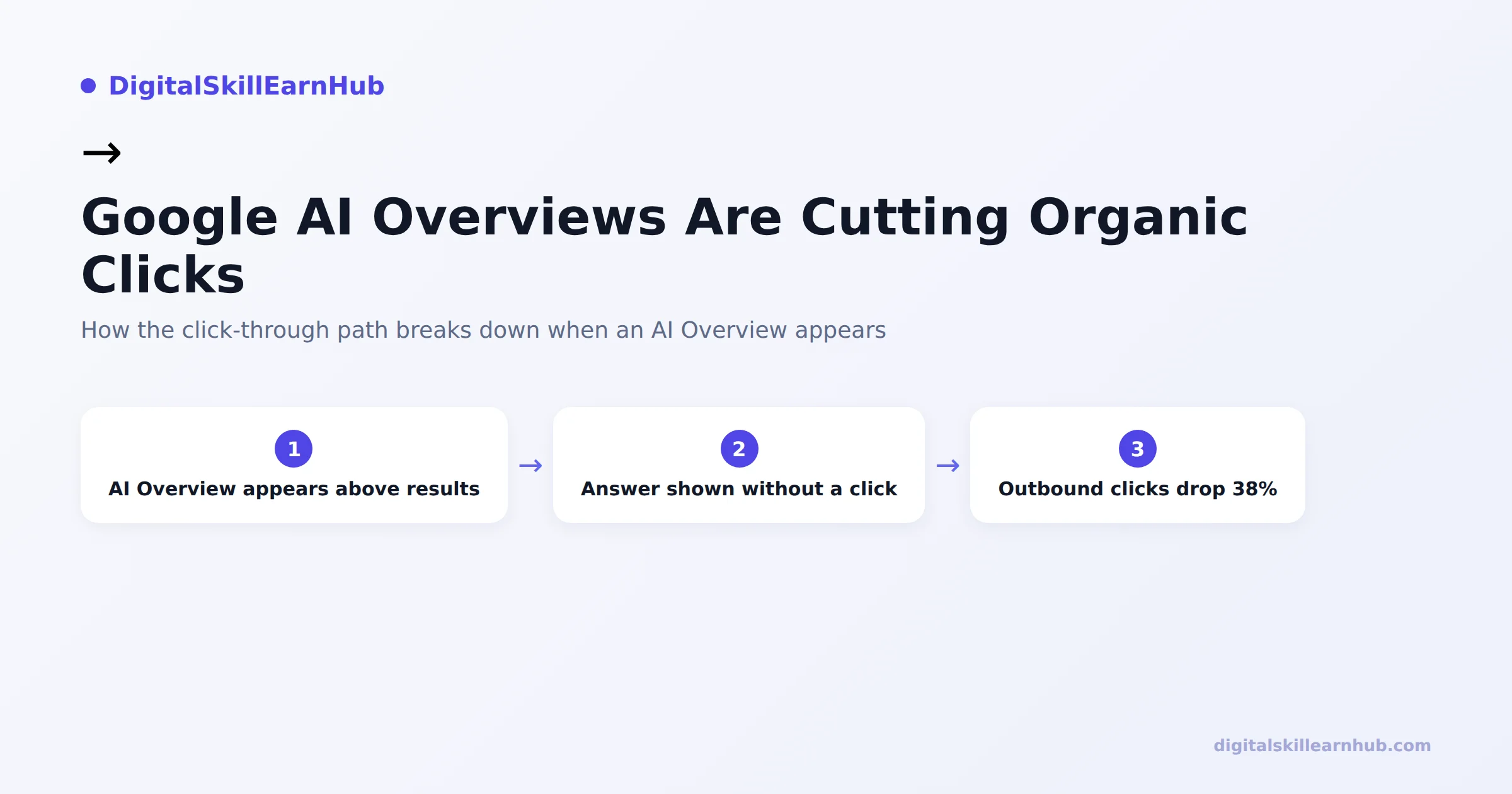
AI Overviews are the AI-generated summary boxes Google shows above the normal organic results for many searches. Instead of listing ten blue links, Google's system reads content from multiple ranking pages, synthesizes an answer, and shows it directly on the results page — often with a handful of source links tucked inside or below the summary.
For the user, this is faster. For the website that would have received the click, it's a direct answer delivered without a visit.
- Your page can still rank well and generate an impression
- Your content may even be one of the sources the AI Overview draws from
- But the user's question gets answered before they reach your result
The 2026 Data: How Much Are Clicks Actually Dropping?
A field study run in January–February 2026 tracked 1,065 US desktop Chrome users to measure the real-world impact of AI Overviews on click behavior. The results confirm what a lot of site owners have been seeing in Search Console:
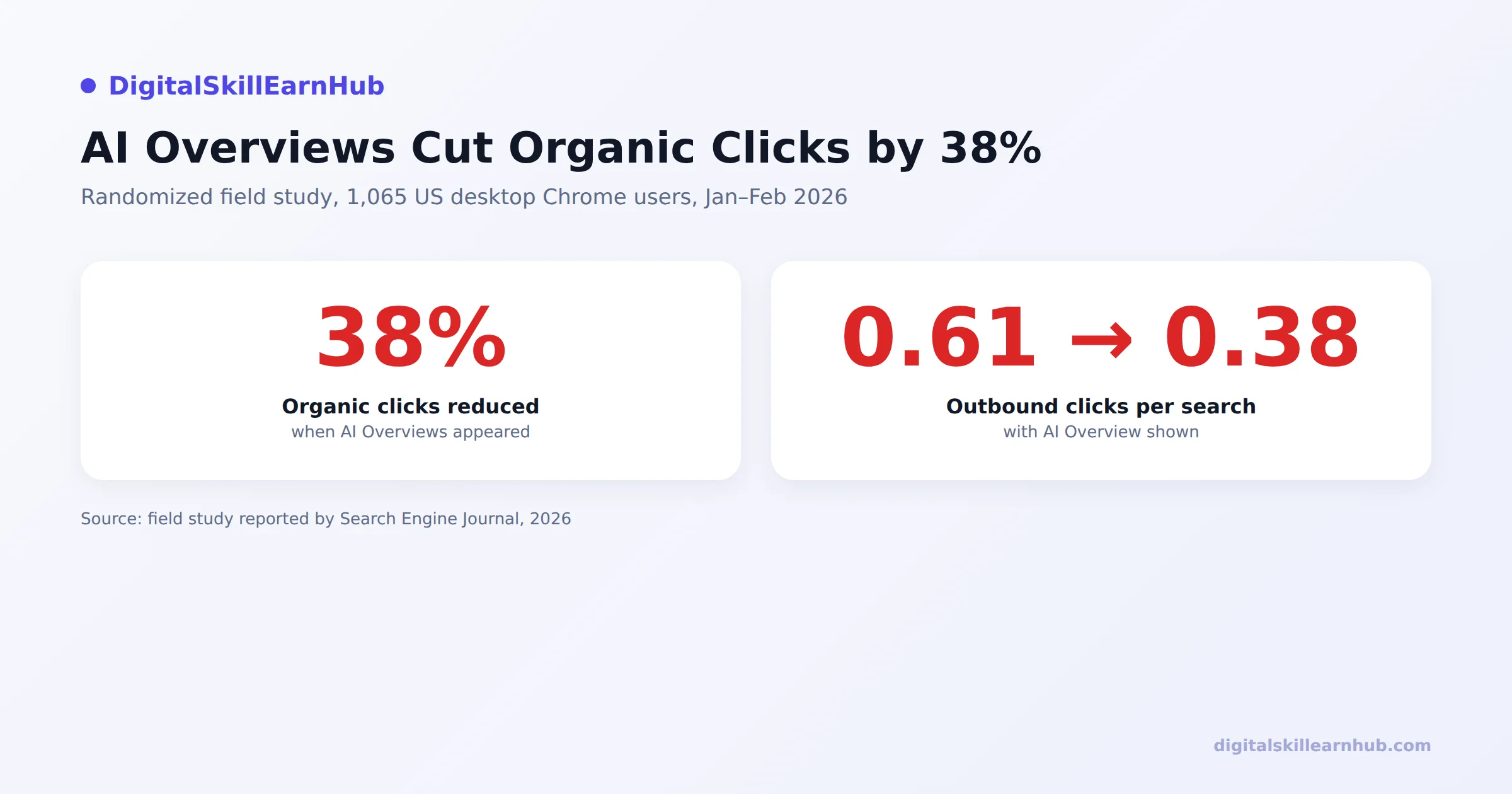
- Organic clicks fell by 38% on searches where an AI Overview appeared
- Outbound clicks per search dropped from 0.61 to 0.38 — users are clicking through to a website less than half as often on average
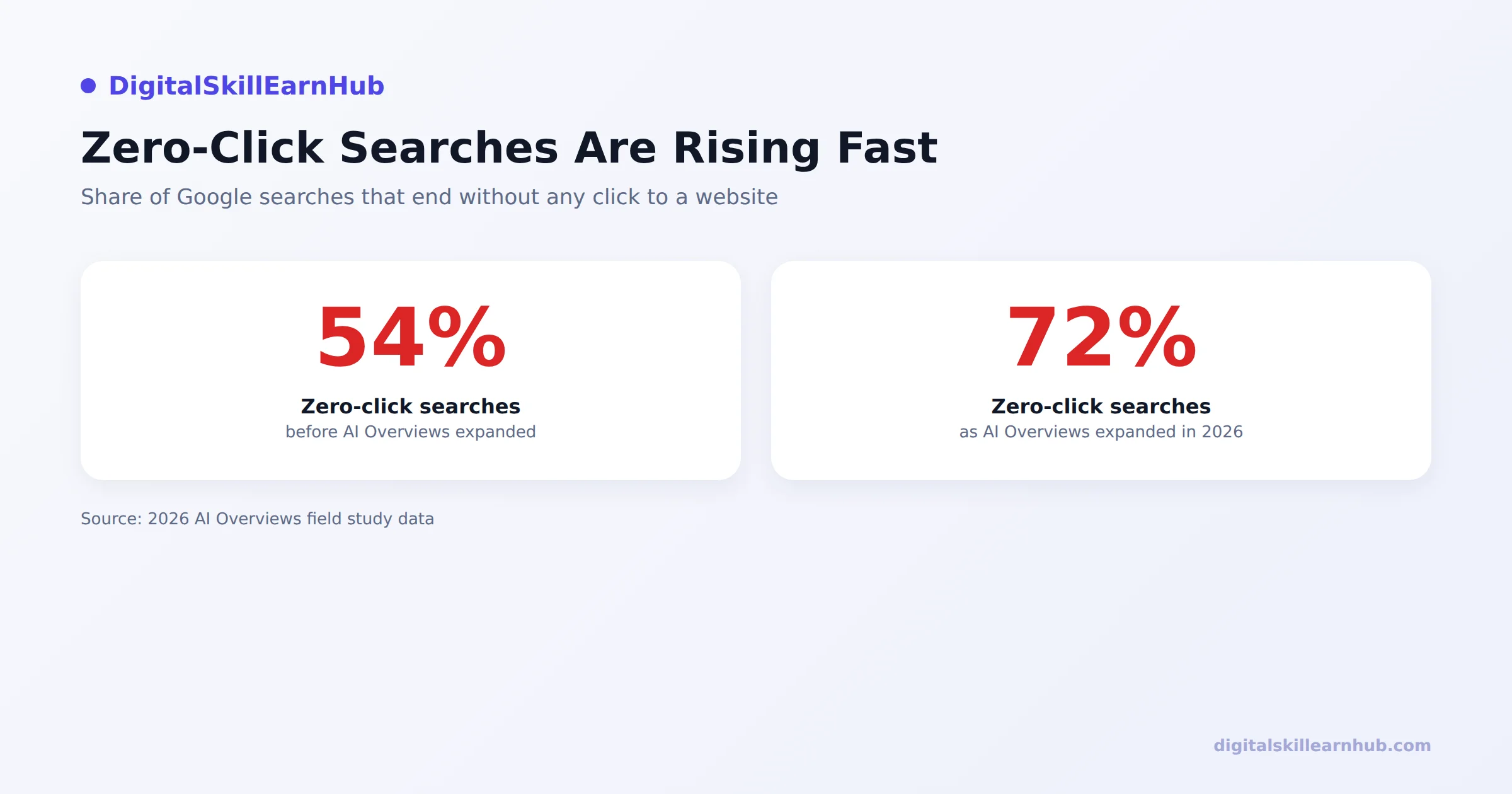
- Zero-click searches rose from 54% to 72% — nearly three out of four searches now end without a single outbound click
- AI Overviews appeared on 42% of tested queries, concentrated on informational and question-based searches
- When the AI Overview sat at the very top of the page (85% of the time it appeared), removing it nearly doubled outbound clicks — showing how much of the drop is directly attributable to the box itself, not a ranking change
- Interestingly, user satisfaction scores stayed statistically unchanged whether or not an AI Overview appeared — users aren't unhappy, they're just getting answers without visiting sites
Why Impressions Keep Rising While Clicks Fall
This is the part that confuses most site owners: your Search Console impressions can go up at the same time your clicks go down, and both numbers are telling the truth.
Impressions are counted whenever your URL appears anywhere on a results page — including as a cited source tucked inside an AI Overview. Google is scanning more content and citing more sources to build these summaries, which can actually increase how often your page shows up. But being cited inside a summary is not the same as being clicked.
- Your page appears as a source → counted as an impression
- The user reads the AI-generated answer instead of visiting → no click recorded
- Result: rising impressions, flat or falling clicks, and a CTR that keeps sliding
If you've been chasing this drop by only rewriting titles, that's treating a symptom. Learn the ranking and intent side of this in our low CTR fix guide, then come back here for the AI Overview–specific fixes below.
Diagnose AI Overview Impact on Your Own Site
Before changing anything, confirm whether AI Overviews are actually the cause of your drop. This takes about ten minutes using data you already have.
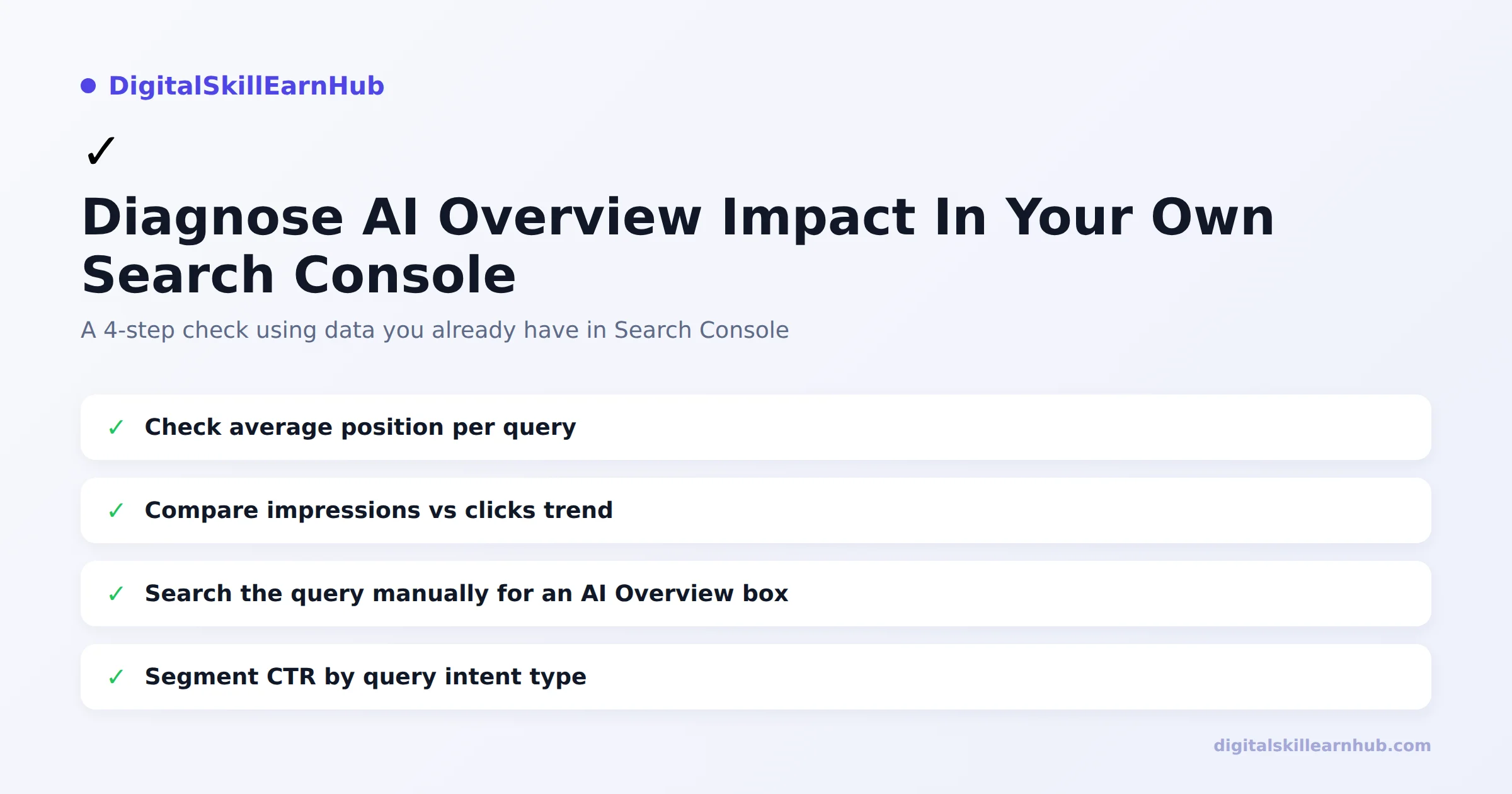
- Check average position per query. If position is stable or improving but CTR is falling, ranking isn't the problem.
- Compare your impressions vs. clicks trend over the last 3–6 months in Search Console's Performance report.
- Search your top queries manually and note whether an AI Overview box appears above the organic results.
- Segment CTR by query intent type. Informational and question-style queries ("how to," "what is," "why does") are the most exposed. Transactional and commercial queries are affected far less.
If most of your traffic comes from informational queries and you're seeing this pattern, the fixes below are the right next step. For the queries not affected, your existing SEO fundamentals — covered in our SEO audit checklist — still apply as normal.
6 Fixes to Recover Clicks From AI Search
You can't opt out of AI Overviews, and you can't force Google to stop summarizing content. What you can do is structure your content so it's more likely to be the source that gets cited — and give users a reason to click through even after reading the summary.
1. Answer the Question in the First Sentence
AI systems extract direct answers, not build-up. If your first paragraph is scene-setting instead of answering the query, you're less likely to be the source pulled into the summary. Put the direct answer first, then expand.
2. Structure Content Around Question Subheadings
Use H2/H3 headings phrased as the actual questions people search ("Why do impressions rise but clicks fall?" rather than "Understanding the Trend"). This matches how AI systems parse and extract answers, and it matches how people scan a page too.
3. Add Specific Data and Numbers, Not Generalities
Generic advice gets paraphrased and discarded. Specific numbers, named studies, and concrete steps are what AI Overviews tend to cite and attribute, because they're harder to summarize away without losing meaning.
4. Give Users a Reason to Go Past the Summary
An AI Overview answers the surface-level question. Your content should go one level deeper — a tool, a step-by-step walkthrough, a checklist, or a case study the summary can't fully replicate. That's the reason to click through instead of stopping at the box.
5. Keep FAQPage Schema on Your Pages
Google removed the visible FAQ dropdown from search results in May 2026, so FAQ schema no longer produces that rich result. But the structured Q&A markup still helps AI systems (including AI Overviews and tools like ChatGPT and Perplexity) parse your content into clean question-answer pairs — which improves your odds of being cited accurately. Don't remove it just because the visual rich result is gone.
6. Prioritize Depth on Your Highest-Impression, Lowest-CTR Pages
Not every page needs a rewrite. Use the diagnostic steps above to find the pages with rising impressions and falling CTR, and focus your content depth improvements there first — that's where AI Overviews are most likely already summarizing your content without sending the click.
For the full framework on writing content that gets cited by AI Overviews, ChatGPT, and Perplexity, see our AEO/GEO optimization guide.
Final Thoughts: This Is a Shift, Not a Dead End
AI Overviews are changing where the click happens, not whether SEO matters. Clicks aren't disappearing evenly — they're consolidating on the pages that answer clearly, back claims with real data, and give users a reason to go deeper than a summary box.
Rankings, titles, and technical SEO still matter, and they're covered in detail in our impressions but no clicks guide. What's new is that content structure — how directly and clearly you answer the question — now decides whether you get cited and clicked, or just summarized and skipped.
FAQs: Google AI Overviews and Clicks
Why are my clicks dropping while impressions keep rising?
Google is answering more queries directly inside AI Overviews, so your page still counts as an impression but users often get their answer without clicking through.
Do AI Overviews affect every keyword?
No. Field data shows AI Overviews appear on roughly 42% of queries, concentrated on informational and question-based searches rather than transactional ones.
Can I opt my pages out of AI Overviews?
There is no dedicated opt-out. Blocking Google's crawler entirely would also remove you from normal search results, so the practical fix is changing how content is structured, not blocking it.
Is FAQ schema still worth adding to pages?
Yes. Google removed the visible FAQ rich-result dropdown in May 2026, but the FAQPage markup still helps AI systems parse and cite your content accurately.
Does this mean SEO is dying?
No. It means the winning format is changing. Clicks are consolidating on pages that answer clearly and get cited as sources, rather than being spread evenly across all ranked results.
How do I check if AI Overviews are affecting my site?
Compare average position against CTR in Search Console for your top queries, then manually search those queries to see if an AI Overview box appears above your result.
Will rewriting titles fix a drop caused by AI Overviews?
Titles help, but if the AI Overview already answers the query, no title alone recovers the click. Structuring the content to be the source the Overview cites matters more.
Are transactional and commercial keywords affected the same way?
Less so. AI Overviews concentrate on informational queries; buying-intent and local searches keep behaving closer to traditional search results.
What is the single biggest mistake sites make here?
Treating the drop purely as a ranking problem and only rewriting titles, when the real issue is that the content isn't structured to be extracted and cited as a direct answer.
Where can I learn how to structure content for AI search?
See our AEO/GEO optimization guide for the full content framework used to get cited by AI Overviews, ChatGPT, and Perplexity.